
The Magento 2 XML Sitemap Extension generates and automatically updates an XML sitemap for your store, helping search engines crawl and index your website more efficiently, which can improve your store’s SEO performance and visibility.
Xml Sitemap Extension
- Automatically generates XML sitemaps to improve SEO and search engine indexing.
- Customizable sitemap structure including product, category, and CMS pages.
- Supports multi-store environments and sitemap generation for different store views.
- Enables setting priority and frequency for specific pages to control indexing.
- Includes image URLs in the sitemap for enhanced visibility in search engines.
- Allows scheduling automatic sitemap updates via cron jobs.

Image Gallery
Highlighted Features
-
Automatic Sitemap Generation
The extension generates an XML sitemap automatically at set intervals (daily, weekly, or monthly), ensuring up-to-date product, category, and CMS pages for improved search engine indexing.
-
Customizable Sitemap Structure
Control which pages to include or exclude and set priorities and frequencies for different page types.
-
Multi-Store Support
Generate individual sitemaps for each store view, with different configurations for localized SEO and region-specific indexing.
-
Sitemap Indexing
For large stores, the extension splits a large sitemap into smaller files and creates a sitemap index for complete indexing, preventing missed pages.
-
SEO-Friendly Features
Set priorities and update frequencies to help search engines determine which pages are most important and when to re-crawl them.
-
CMS Pages and Custom URLs
Include static CMS pages and custom URLs in the sitemap to ensure all valuable pages, even external links, are indexed.
-
Multi-Language Support
Create language-specific sitemaps to improve international SEO by ensuring the correct indexing for each region.
-
Sitemap Performance Optimization
Compress sitemaps into .gz format to reduce file sizes, improving load speeds and efficiency for search engine crawling.
Description
Sitemap Generation
The XML Sitemap Extension for Magento 2 boosts SEO by automatically generating customizable sitemaps for better search engine crawling. It allows admins to select pages, products, and categories for inclusion, manage update frequency, and prioritize important pages. With multi-store support, it improves search visibility and ensures compliance with SEO guidelines.
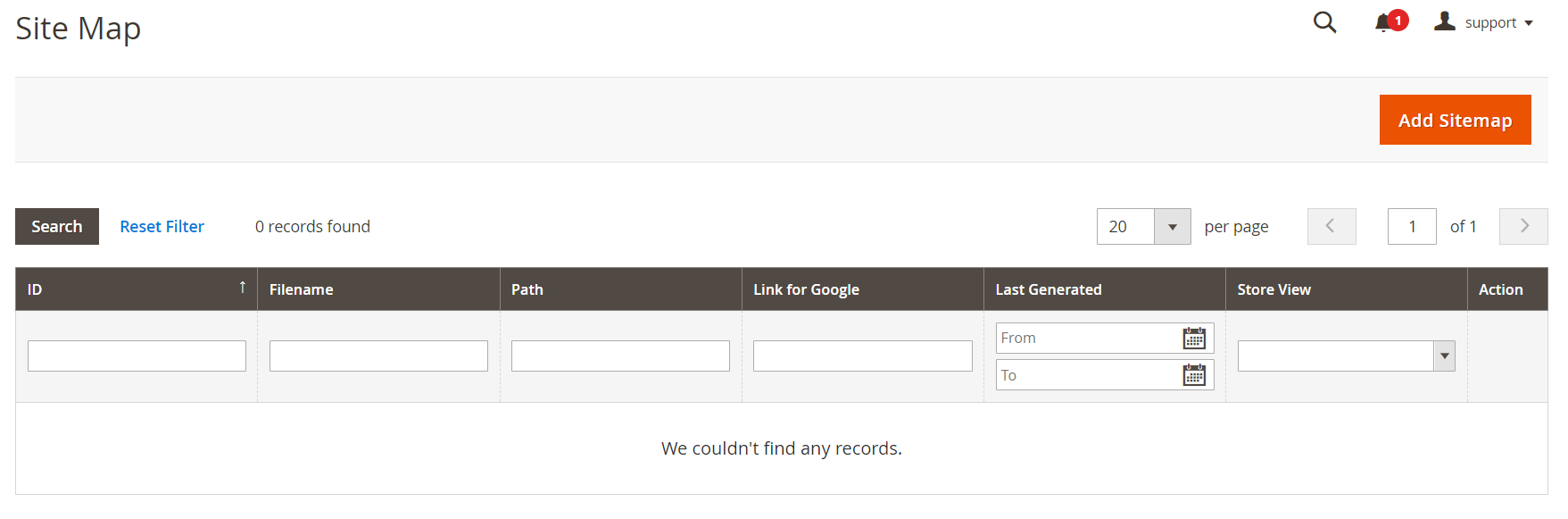
- Now that you set up sitemap settings, you can create your XML sitemap file.
- Navigate to Marketing > Seo & Search > Site Map and press the Add Sitemap button.
Add New Sitemap
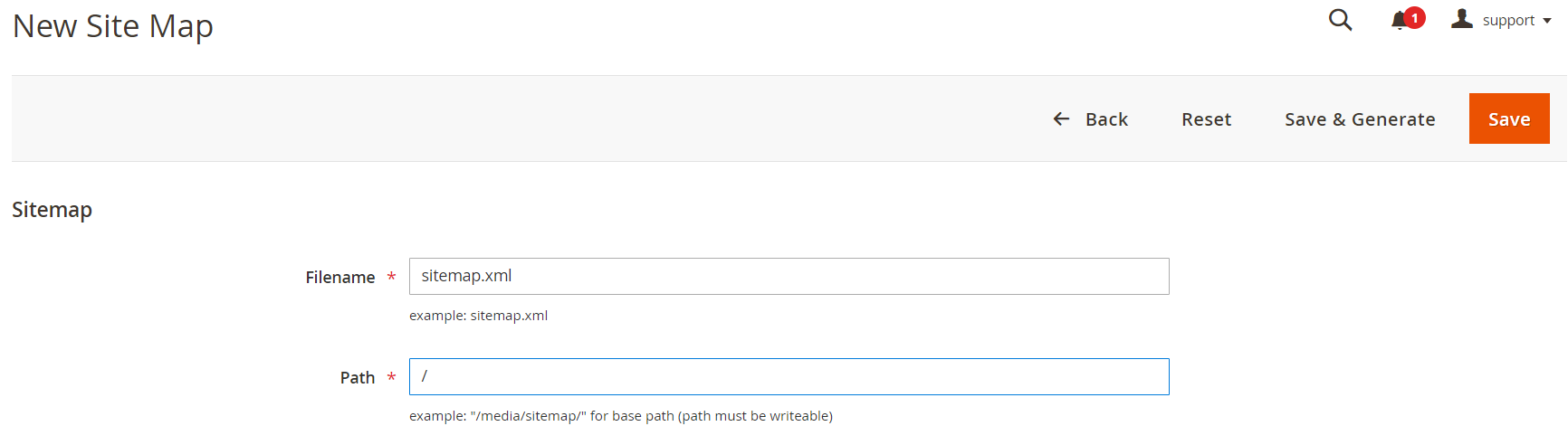
- Set the name of the XML file in the Filename field, enter the Path where it should be located and press the Save & Generate button.
- Once you finish you'll find the generated sitemap in the list of sitemaps.
Automate Magento Sitemap Generation
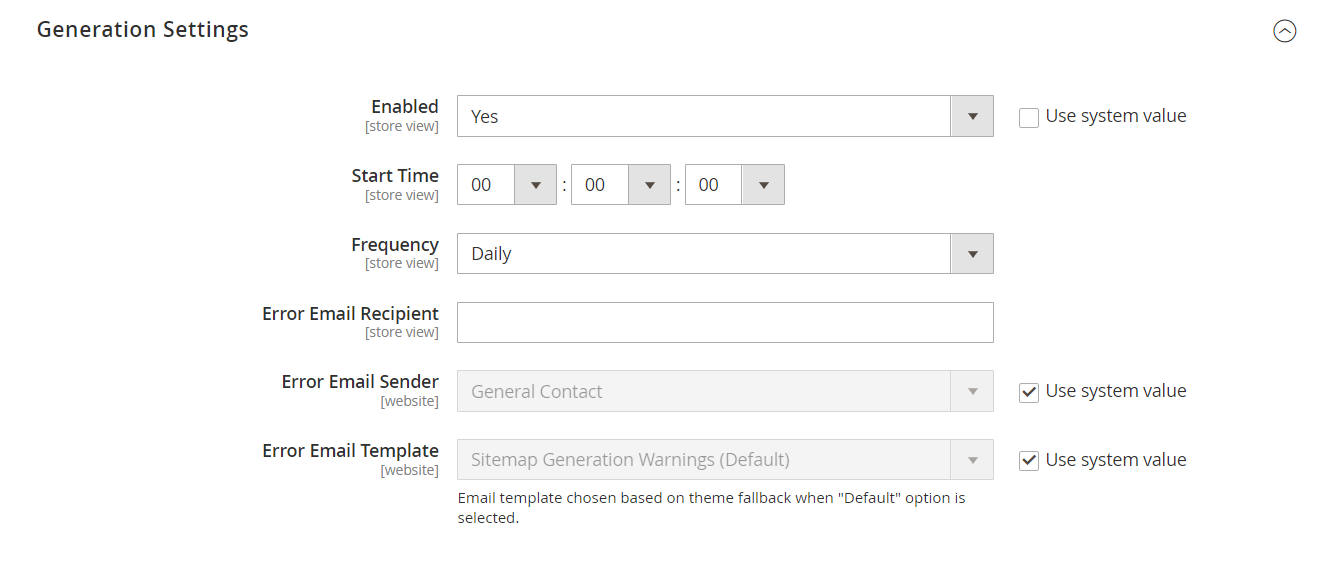
- If you've followed this guide from the start, you might have noticed this. You've already set up the auto-generation of the sitemap.
- Once you fill out the Generation Settings in the Stores > Configuration > Catalog > XML Sitemap section all you need is to submit the XML file to Google Search Console. Search robots will retrieve all the data from there.
Exclude Some Pages From XML Sitemap
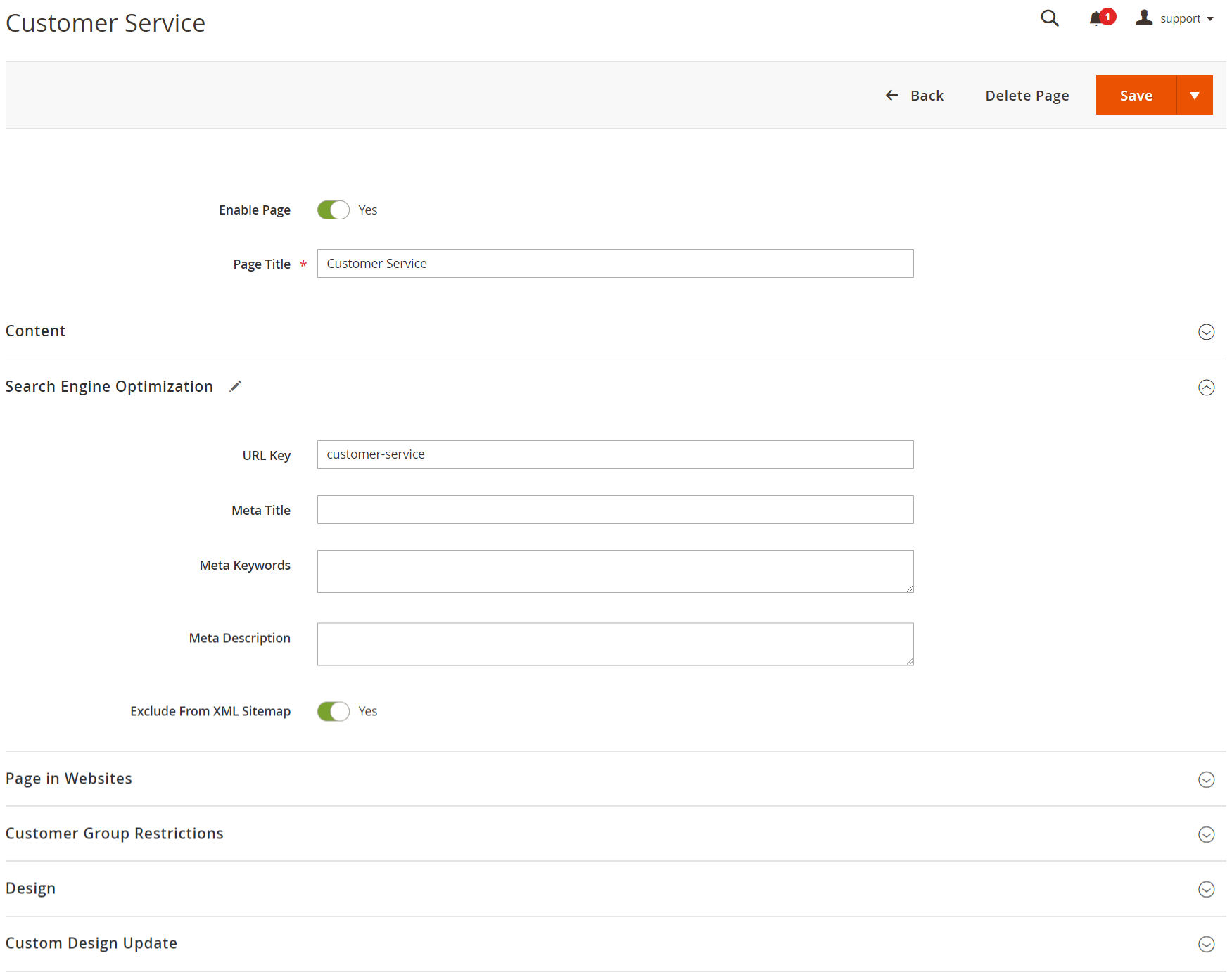
- Although Magento allows you to handle the XML sitemap seamlessly, it doesn't offer an option to disable pages from the sitemap. And that might come in handy if you have some pages that you don't want in search results.
- In that case, you can resort to the Magento 2 XML Sitemap extension, that allows you to exclude pages from sitemap in Magento.
FAQs
What is an XML Sitemap?
What is an XML Sitemap?
An XML Sitemap is a file that lists all important pages of your site to help search engines crawl and index your site efficiently.
Can I customize the XML sitemap?
Can I customize the XML sitemap?
Yes, the module allows you to include or exclude specific pages, categories, or products from the sitemap to tailor it to your SEO strategy.
How often is the sitemap updated?
How often is the sitemap updated?
The module allows you to set automatic updates for your XML sitemap, ensuring it stays current as new products and pages are added to your site.
Do I need any technical knowledge to use this module?
Do I need any technical knowledge to use this module?
No, the "XML Sitemap" module is easy to use, and no technical expertise is required to generate and manage sitemaps for your Magento store.
Is the module compatible with other SEO tools?
Is the module compatible with other SEO tools?
Yes, the XML Sitemap module integrates seamlessly with other SEO tools like Google Search Console and Bing Webmaster Tools, enhancing your SEO efforts.
Can I include product images in the XML sitemap?
Can I include product images in the XML sitemap?
Yes, the module allows you to include images of products, which can help improve product visibility and indexing on search engines.
Does the module support multiple languages?
Does the module support multiple languages?
Yes, the module supports multi-language stores, ensuring your XML sitemaps include links for all language versions of your pages.
Ask a question
Customer Reviews
Ratings
5
Reduces manual maintenance effort
Review by
HiroshiTanaka
Eliminates the need for manual sitemap updates by automatically regenerating sitemaps when catalog changes occur.
Ratings
5
Improves SEO visibility
Review by
ElenaGarcia
Keeps sitemap updated with new and updated content, ensuring search engines discover pages faster and more accurately.
Ratings
5
Simple scheduling and configuration
Review by
MariaSantos
Provides an easy-to-use admin interface to configure sitemap generation frequency and rules with minimal setup.
Ratings
5
Automates sitemap generation for better indexing
Review by
AaravPatel
Generates XML sitemaps for products, categories, and CMS pages automatically, helping search engines crawl and index the site efficiently.
Ratings
5
Reliable scheduling feature
Review by
CalebWinchester
Automatic sitemap generation based on cron schedules works perfectly for keeping data updated.
Ratings
5
Excellent SEO improvement
Review by
DanielWhitmore
This extension automatically generates XML sitemaps for all products, categories and CMS pages which makes it much easier for search engines to index our Magento store. After installing it we noticed faster indexing of new products and improved visibility in search results.
Ratings
5
Improves search visibility
Review by
AbigailSinclair
Since using this extension our pages are being discovered more frequently by search engines.
Ratings
5
Improved indexing speed
Review by
EthanMontague
After submitting the generated sitemap to Google Search Console, our product pages started getting indexed much faster.
Ratings
4
Improves SEO with Sitemaps
Review by
Miles T.
XML Sitemap extension works well for improving SEO. It helps ensure search engines find and index all the pages on my store.
Ratings
5
Efficient SEO management
Review by
EvanMontrose
Automating sitemap generation reduces manual SEO tasks for our team.
Ratings
5
Good compatibility
Review by
MayaBradshaw
The extension works well with other Magento modules installed in our store.
Ratings
5
Helpful SEO tool
Review by
HarperThornton
Having a structured sitemap improves search engine visibility and ensures no important pages are missed.
Ratings
5
Automatic updates
Review by
EmilyLangley
Whenever we add new products the sitemap updates automatically which saves a lot of manual work.
Ratings
5
Helpful for international stores
Review by
TylerAshford
Multi-language sitemap support helps improve indexing for different store views.
Ratings
5
Supports multiple stores
Review by
HenryFairfax
We run multiple store views and the extension generates separate sitemaps for each store which is very useful.
Ratings
5
Easy configuration
Review by
SophiaLangford
The admin configuration panel is very simple. Within minutes we had automated sitemap generation running on a schedule.
Ratings
5
Improves SEO
Review by
Evan C.
The XML Sitemap extension is crucial for my SEO efforts. It helps search engines index my products more efficiently.
Ratings
5
Useful page inclusion options
Review by
HannahMontgomery
Being able to add custom URLs and CMS pages ensures all important content is indexed.
Ratings
5
Professional implementation
Review by
BrookeCarrington
The extension follows Magento coding standards and integrates well with the platform.
Ratings
5
Great customization options
Review by
IsabellaWhitaker
We can easily include or exclude certain pages and define update frequency and priority for different page types.
Ratings
5
Excellent for large catalogs
Review by
NoahBennett
Our store has thousands of products and the extension handles sitemap generation without any issues.
Ratings
5
Very useful SEO extension
Review by
MarcusThorpe
It simplifies sitemap management and ensures our catalog stays visible to search engines.
Ratings
5
Easy installation
Review by
GraceHollister
Installation through composer was straightforward and the extension worked immediately after configuration.
Ratings
5
Very practical extension
Review by
JackRedmond
This module provides an important SEO feature that every Magento store should use.
Ratings
5
Good performance optimization
Review by
SamuelAshcroft
The ability to compress sitemaps into smaller files improves loading speed and indexing efficiency.
Ratings
5
Flexible configuration
Review by
DominicLangdon
We can easily adjust sitemap settings based on our SEO strategy.
Ratings
5
Great backend interface
Review by
LilyPennington
The sitemap management interface in the Magento admin panel is very intuitive.
Ratings
5
Reliable sitemap generator
Review by
AmeliaHarrington
The extension consistently generates accurate sitemap files and keeps them updated automatically.
Ratings
5
Very stable module
Review by
ZoeBlackstone
We have been using this extension for months and it runs smoothly without issues.
Ratings
5
Highly recommended
Review by
NatalieHarrington
If you want an easy way to generate and maintain XML sitemaps in Magento 2, this extension is a great solution.
Ratings
5
Great for SEO management
Review by
LiamPrescott
This module helps ensure that all important pages of our store are included in the sitemap which improves search engine crawling.
Ratings
5
Perfect sitemap automation
Review by
OliviaCarson
Managing sitemaps manually was time consuming. With this extension the sitemap updates automatically whenever products or pages are added, keeping everything synchronized.
Ratings
5
Works perfectly with Magento
Review by
LucasCrawford
The module integrates smoothly with Magento 2 and requires very little maintenance once configured.
Ratings
5
Great admin control
Review by
NathanCarrington
The settings allow us to control which URLs appear in the sitemap and how often they are updated.
Ratings
5
Good sitemap structure
Review by
MasonRedford
The generated XML file is well organized and follows search engine guidelines.
Ratings
5
Improves website indexing
Review by
PaigeBlackwell
After implementing this extension our store pages appear faster in search engine results.
Ratings
5
Very helpful for SEO strategy
Review by
ConnorEverett
Our SEO team uses the sitemap to track indexed pages and optimize our site structure.
Ratings
5
Excellent SEO integration
Review by
DylanWhitfield
The sitemap works perfectly with Google Search Console and other SEO tools.
Ratings
5
Helps search engines crawl better
Review by
VictoriaKensington
The extension ensures search engines can easily discover and index all product pages.
Ratings
5
Clean and accurate output
Review by
VanessaFairfield
The generated sitemap files are correctly formatted and accepted by search engines without errors.
Ratings
5
Very User-Friendly
Review by
Jason Morgan
Quick to install and intuitive to use. It has helped us manage sitemaps better than ever.
Ratings
5
Perfect for SEO
Review by
Richard Walker
Improved our SEO results by optimizing our sitemap. Simple, effective, and essential for search visibility!
Ratings
5
Essential for SEO Management
Review by
Danielle Brown
Our SEO strategy relies on it! Keeps sitemaps updated without any hassle.
Ratings
5
Boosted Site Ranking
Review by
Samantha Roberts
After using this, our search rankings improved significantly. Definitely recommend it!
Ratings
5
Made SEO Easy
Review by
Linda Nelson
SEO is simpler with this module. It keeps our sitemaps fresh and accurate.
Ratings
5
Easy SEO Boost
Review by
Thomas Jenkins
Simple yet effective! Our sitemap management is now completely automated, and it's been a major boost for our site’s SEO.
Ratings
5
Great SEO Module
Review by
Jennifer Hughes
A must-have for maintaining an up-to-date sitemap without any manual effort.
Changelog
1.1.0 – March 18, 2026
- Minor Bug Fixes
1.0.4 – June 26, 2025
- Fully compatible with Magento 2.4.8-p1.
1.0.3 – September 1, 2024
- Fully compatible with Magento 2.4.7-p3.
- Ensure the XML sitemap does not include 'no-route', 'home', or 'enable-cookies' pages by default.
1.0.2 – May 26, 2023
- Fully compatible with Magento 2.4.6.
1.0.1 – September 13, 2020
- Made minor enhancements to the code.
1.0.0 – February 11, 2018
- Initial launch.
$0
No surprise fees
We are committed to being open and transparent with our customers. When you purchase our module, you automatically receive one year of free support service and free updates.
Why is this important?
- Seamless Installation and Configuration: We understand that setting up a new module can take time to configure according to your specific needs. That's why we offer a full year of free support. Our experienced team is here to assist you with installation, configuration, and any questions you might have. We're eager to share our expertise to ensure you get the most out of your purchase.
- Stay Updated with Magento (Adobe Commerce) Releases: Magento releases new versions approximately every three months. These updates can sometimes introduce compatibility challenges. To keep your store running smoothly, we provide a year of free access to the latest versions of our modules, ensuring that you can upgrade Magento and our modules without encountering any obstacles.
- Subscription Included: Renewing your subscription ensures continued access to the latest updates and support from our team. This means you can be confident that any issues you encounter with the extension will be resolved quickly and efficiently. You can cancel your subscription at any time without any additional fees.
- Free Installation
- 30 Days Money Back
- 1 Year Of Free Support
- Open Source East To Customize
- Meets Magento Code Standards