

Whatsapp Extension
WhatsApp Share Extension enables customers to easily share products and pages from your store directly to their WhatsApp contacts, enhancing social engagement and driving traffic. This feature boosts product visibility, encourages word-of-mouth marketing, and simplifies the sharing process.
- Integrates WhatsApp chat functionality into the Magento store.
- Allows customers to contact support or make inquiries via WhatsApp.
- Provides a customizable WhatsApp button on product and CMS pages.
- Supports sending order confirmations and updates through WhatsApp.
- Enhances customer engagement and support efficiency.


Highlighted Features
-
WhatsApp Chat Button
Adds a customizable WhatsApp button for easy customer support access on product pages, checkout, or footer.
-
Customizable Chat Widget
Adjust colors, fonts, placement, and visibility (e.g., during business hours) to match your brand.
-
Product Sharing
Lets customers share product details via WhatsApp to boost visibility and drive word-of-mouth.
-
Multi-Agent Support
Routes chats to the right agent based on query type for faster, more relevant support.
-
Analytics & Reports
Tracks chat metrics like volume, response time, and satisfaction to improve support performance.
Description
Configuration
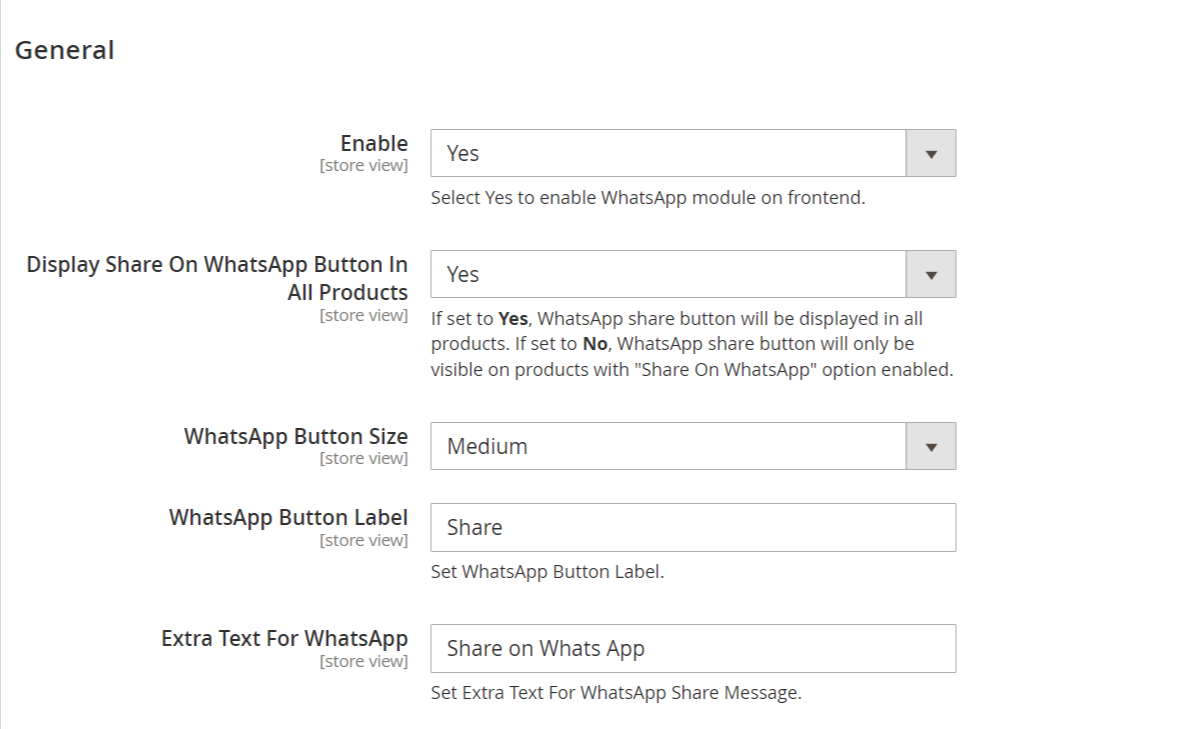
The Mavenbird Cancel Order module allows customers to cancel eligible orders directly from their account. Admins can enable or disable the cancel button and configure module settings from the backend.
- Go to Store → Configuration → MAVENBIRD EXTENSIONS → Cancel Order.
- Dropdown option to enable or disable the cancel order button on the frontend.
- Optionally configure which order statuses are eligible for cancellation (pending, new).
Frontend View – Order History / Order View

- Customers navigate to their Order History or Order View page.
- Click the Cancel Order button if the order status allows cancellation.
- Select a predefined reason or enter a custom reason in the popup.
- Submit the cancellation request and receive an instant success or error message.
- The button only appears for eligible orders (pending or new).
FAQs
How can I fix the "Invalid booking request" error?
How can I fix the "Invalid booking request" error?
The "Invalid booking request" error may be caused by incorrect input data or validation issues. Check your booking form for required fields and ensure that all data complies with the specified formats. Additionally, ensure that your extension is up to date.
Why is the WhatsApp button not appearing on mobile devices in Magento 2?
Why is the WhatsApp button not appearing on mobile devices in Magento 2?
If the WhatsApp button is not showing on mobile devices, first check if the extension is configured to display on mobile. Go to Stores > Configuration > WhatsApp Integration and make sure the option to show the WhatsApp button on mobile is enabled. Also, inspect the mobile view CSS and JavaScript for any conflicts that might hide the button. Test with a different theme to rule out theme-specific issues.
How to resolve the "Invalid API Key" error in Magento 2 WhatsApp Extension?
How to resolve the "Invalid API Key" error in Magento 2 WhatsApp Extension?
The "Invalid API Key" error occurs when the API key used for integrating WhatsApp with Magento 2 is incorrect or expired. Verify the API key in Stores > Configuration > WhatsApp Integration. Ensure that the key is copied correctly without extra spaces and is still active. If the problem persists, contact your WhatsApp API provider for assistance or generate a new key.
Customer Reviews
Changelog
1.1.1 – December 30, 2025
- Upgraded for compatibility with Magento 2.4.8-p3.
- Compatible with PHP version 8.4.
1.1.0 - September 1, 2024
- Minor Bug Fixes
1.0.6 – June 6, 2024
- Now compatible with Magento 2.4.7-p3.
1.0.5 – March 16, 2022
- Now compatible with Magento 2.4.3
1.0.4 – June 9, 2021
- Revised Admin Panel Menu Structure.
- Enhanced Installation Process.
- Updated folder structure to align with the Magento version guidelines.
1.0.3 – March 16, 2020
- Revised Admin Panel Menu Structure.
- Enhanced Installation Process.
1.0.2 – July 22, 2019
- Resolved compilation issues.
1.0.1 – January 16, 2019
- Compatibility added for PHP 7.
- Resolved minor issues.
1.0.0 – February 7, 2018
- Initial launch.
We are committed to being open and transparent with our customers. When you purchase our module, you automatically receive one year of free support service and free updates.
Why is this important?
- Seamless Installation and Configuration: We understand that setting up a new module can take time to configure according to your specific needs. That's why we offer a full year of free support. Our experienced team is here to assist you with installation, configuration, and any questions you might have. We're eager to share our expertise to ensure you get the most out of your purchase.
- Stay Updated with Magento (Adobe Commerce) Releases: Magento releases new versions approximately every three months. These updates can sometimes introduce compatibility challenges. To keep your store running smoothly, we provide a year of free access to the latest versions of our modules, ensuring that you can upgrade Magento and our modules without encountering any obstacles.
- Subscription Included: Renewing your subscription ensures continued access to the latest updates and support from our team. This means you can be confident that any issues you encounter with the extension will be resolved quickly and efficiently. You can cancel your subscription at any time without any additional fees.
- Free Installation
- 30 Days Money Back
- 1 Year Of Free Support
- Open Source East To Customize
- Meets Magento Code Standards