

Return Merchandise Authorization (RMA) Extension For Magento 2
Magento 2 RMA (Return Merchandise Authorization) Extension empowers your store with a streamlined return and exchange process, allowing customers to request product returns directly from their accounts—enhancing post-purchase satisfaction and building trust in your brand.
- Centralized interface for handling all return, exchange, and credit memo operations.
- Access to complete communication history for each Return Merchandise Authorization (RMA).
- Predefined responses for quick and efficient customer communication.
- Utilize workflow rules to automatically assign RMA statuses and designate responsible managers.
- Customizable RMA statuses, reasons, and resolutions for tailored processing.
- Support for RMA requests initiated from offline point-of-sale locations.

Highlighted Features
-
Unified RMA Management Panel
A central dashboard for managing all return, exchange, and credit memo tasks, streamlining workflows and enhancing user experience.
-
Comprehensive Communication History
Detailed logs of all interactions related to each RMA, providing full context for customer service agents to resolve issues efficiently.
-
Predefined Reply Templates
Customizable templates for common customer inquiries, facilitating quick and consistent communication to enhance response times.
-
Automated Workflow Rules
Dynamic management of RMA routing and status updates based on predefined criteria, reducing manual effort and improving task prioritization.
-
Automated Workflow Rules
Dynamic management of RMA routing and status updates based on predefined criteria, reducing manual effort and improving task prioritization.
-
Customizable RMA Statuses
The ability to define tailored statuses and reason codes that align with specific business needs, enabling better tracking and reporting of returns.
-
Support for Offline RMA Requests
Integration for managing RMA requests from physical retail locations, ensuring a seamless experience across online and offline sales channels.
Description
Manage Rma
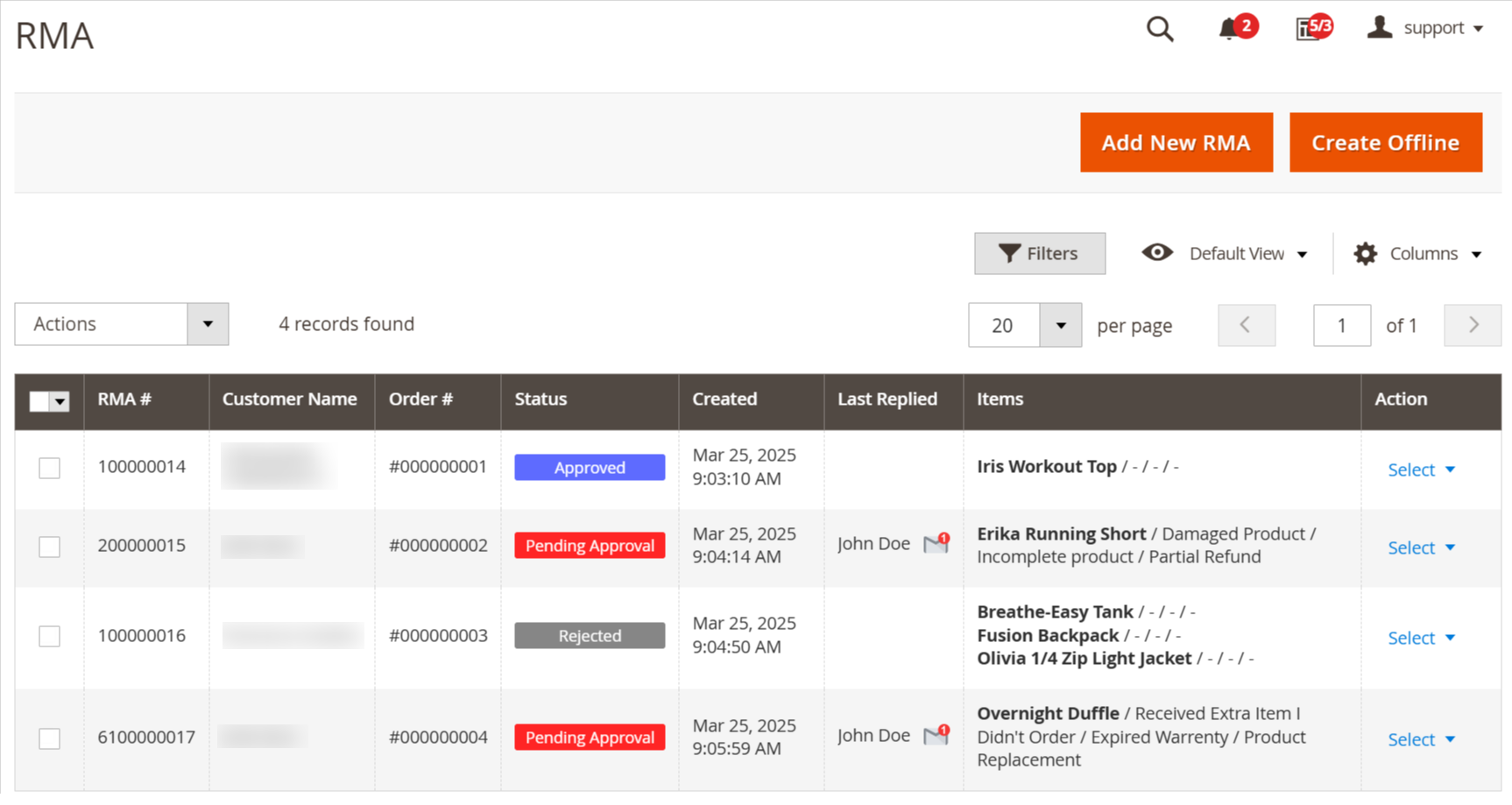
Automate and streamline Magento 2 returns with a robust RMA extension that reduces staff workload and unifies return, exchange, and credit memo management. Improve customer experience with an intuitive interface, automated workflows, custom statuses, and POS return support.
- Navigate to Mavenbird > RMA > Manage RMA to view, manage, edit, and remove all return requests. This section allows you to create new RMA requests, including both standard and offline returns, ensuring efficient handling of customer returns and exchanges.
Create RMA - Regular Mode
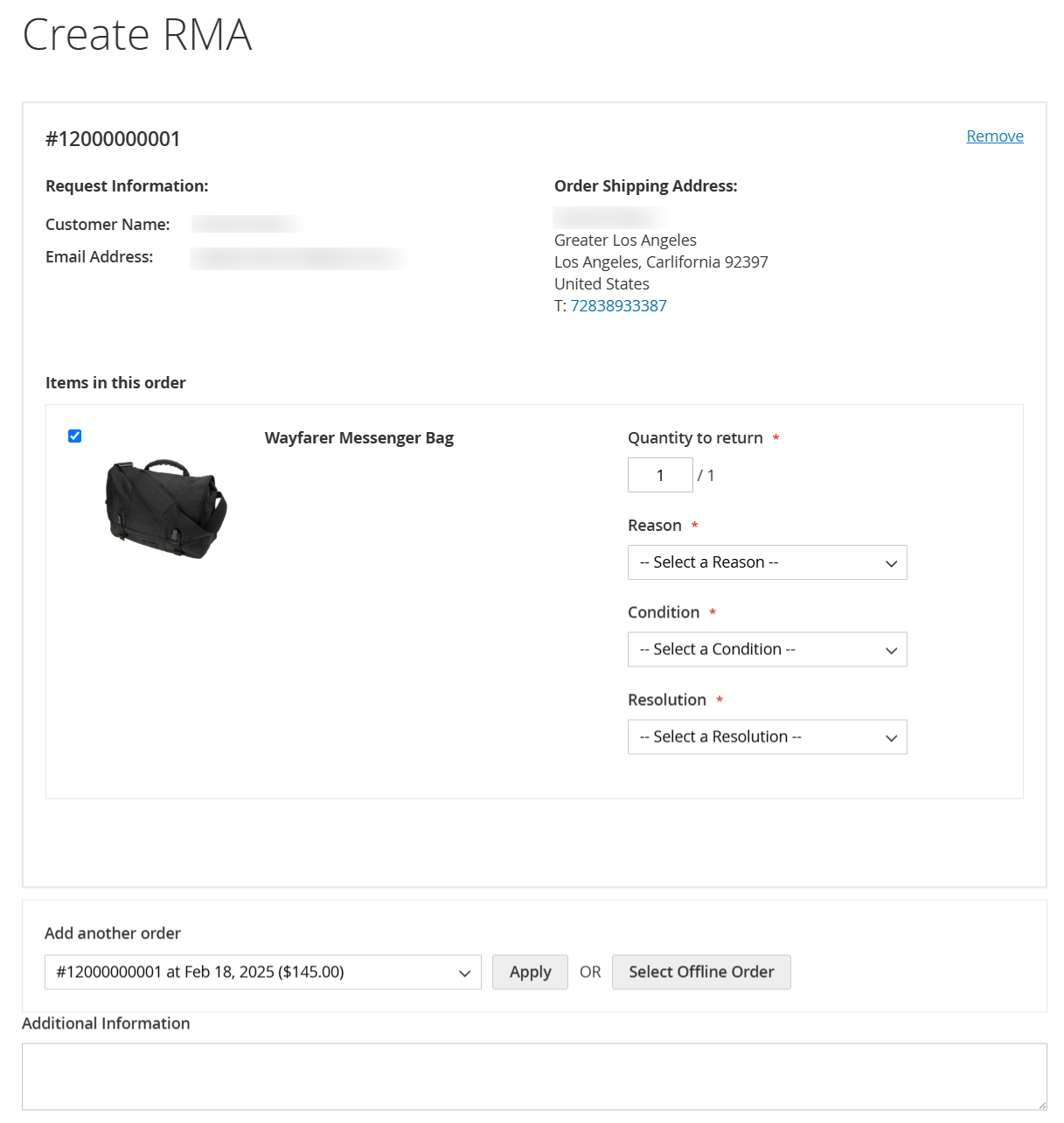
- Ensure RMAs are submitted within the allowed time frame set in the RMA Policy Settings, with configurable conditions such as eligible order statuses and return request periods.
- Customers can initiate returns only if the predefined criteria are met. For existing orders, RMAs can be submitted in Regular Mode, available for registered users via a dropdown or through the Guest Form.
Create RMA - Offline Mode
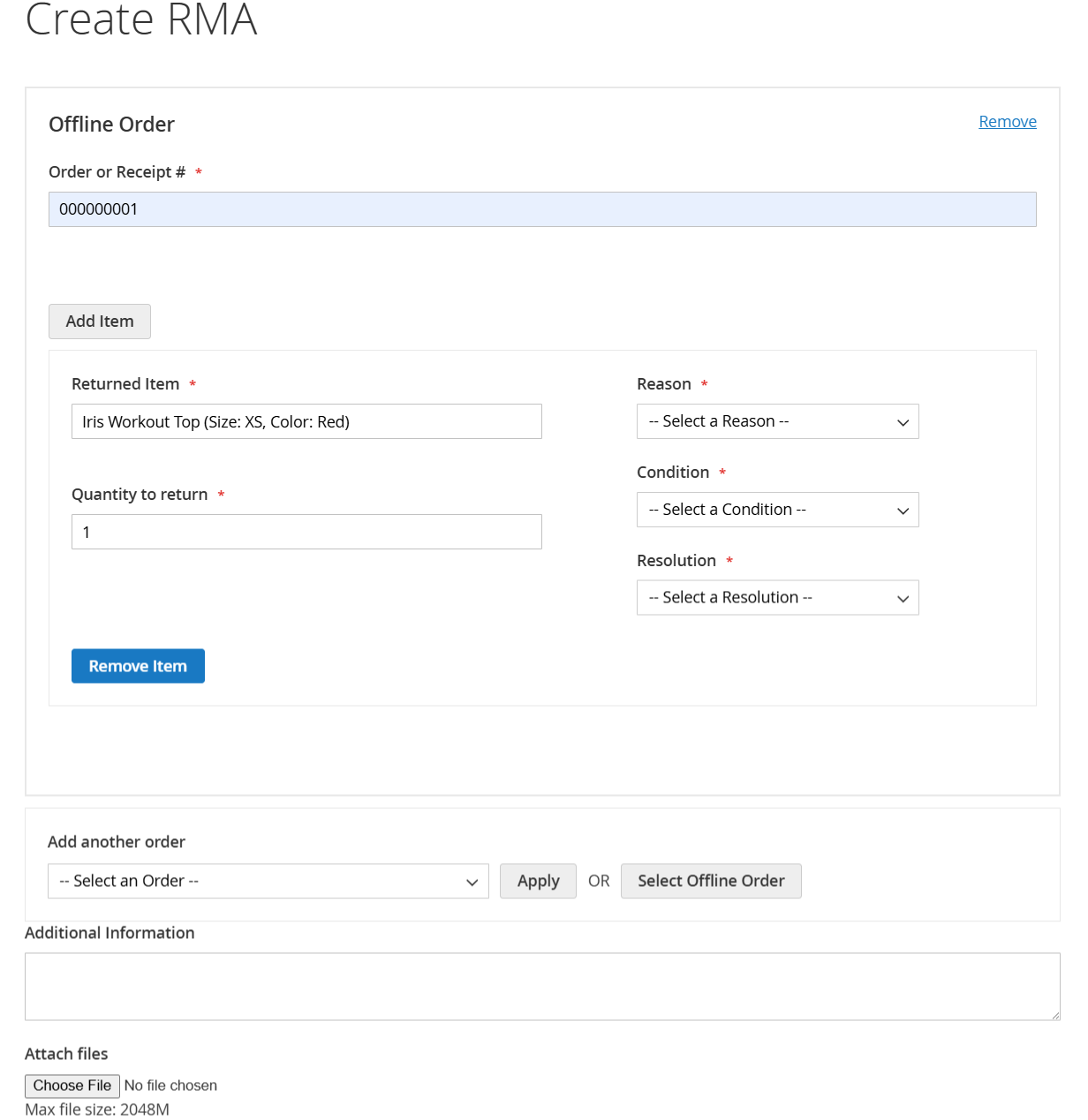
- If an order does not exist in the system, customers can create an RMA in Offline mode by selecting the “Create Offline Order” option from the drop-down. They will be required to manually enter the order number and specify the products they wish to return.
Approve RMA
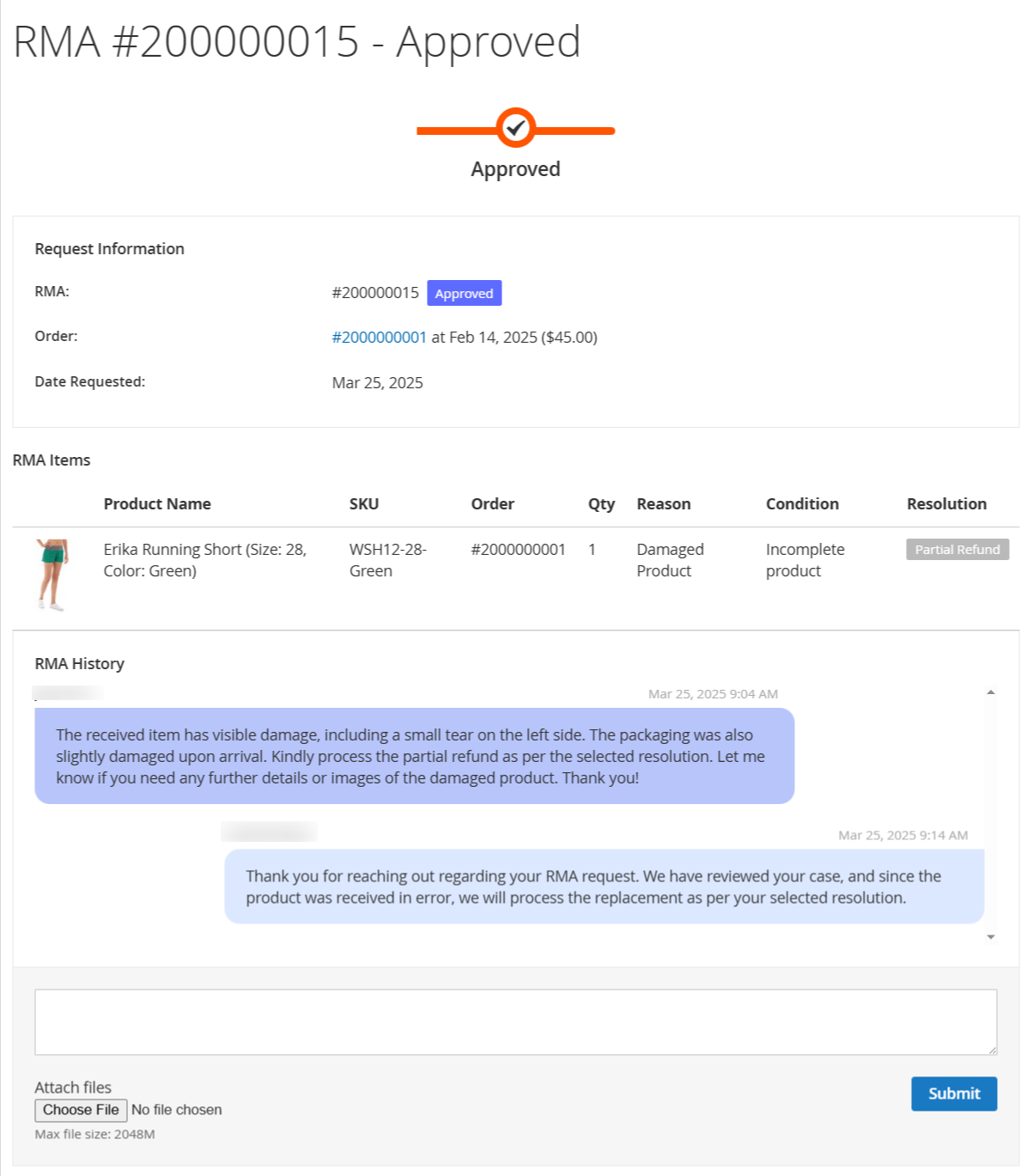
- When the admin can approve the rma request from the backend that is shown on frontend.
Manage Status
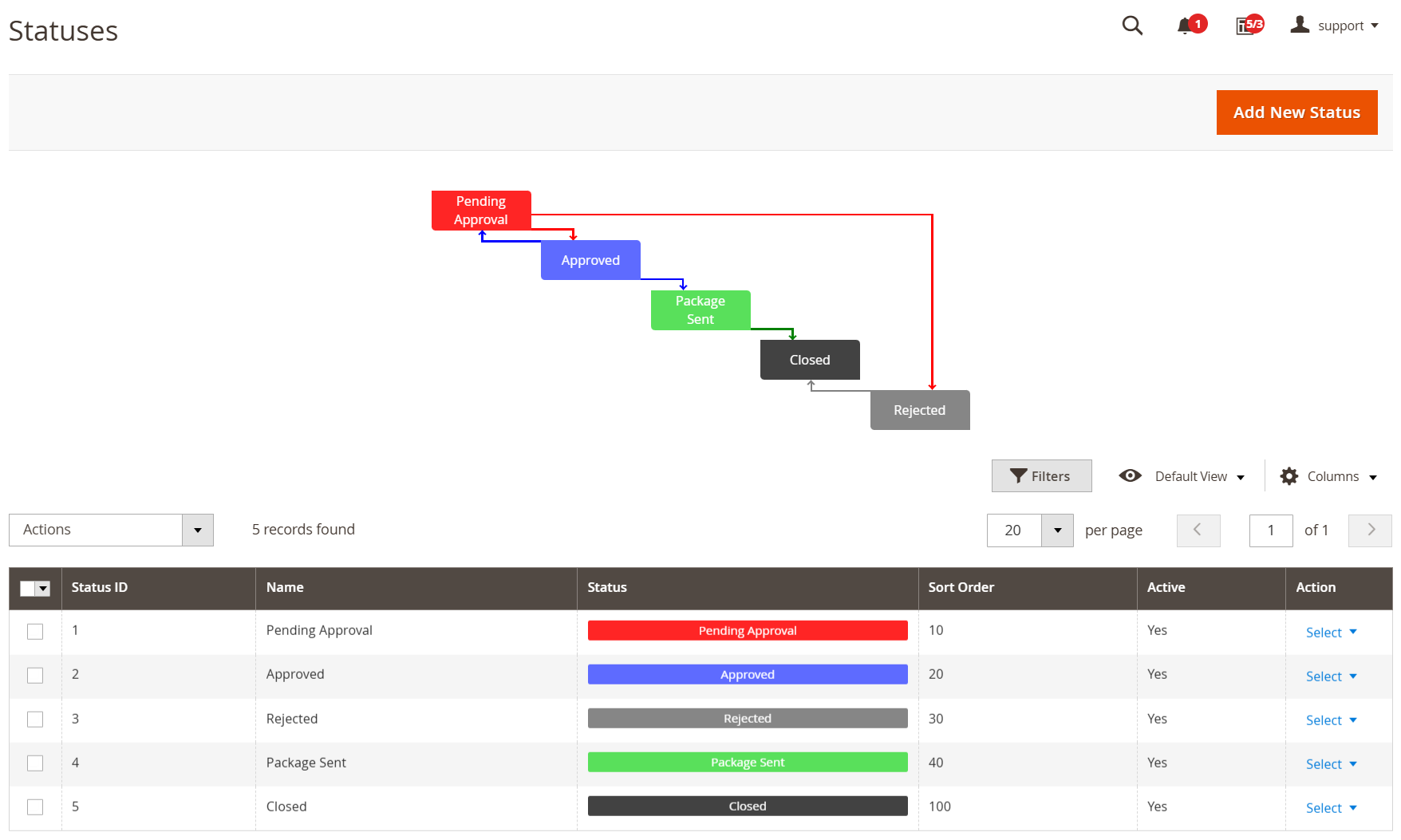
- Display the current status of RMA (Return Merchandise Authorization) requests to customers.
- Use color-coded labels for easy identification of different RMA stages.
- Help store admins quickly differentiate RMA requests based on their status.
Manage Reasons
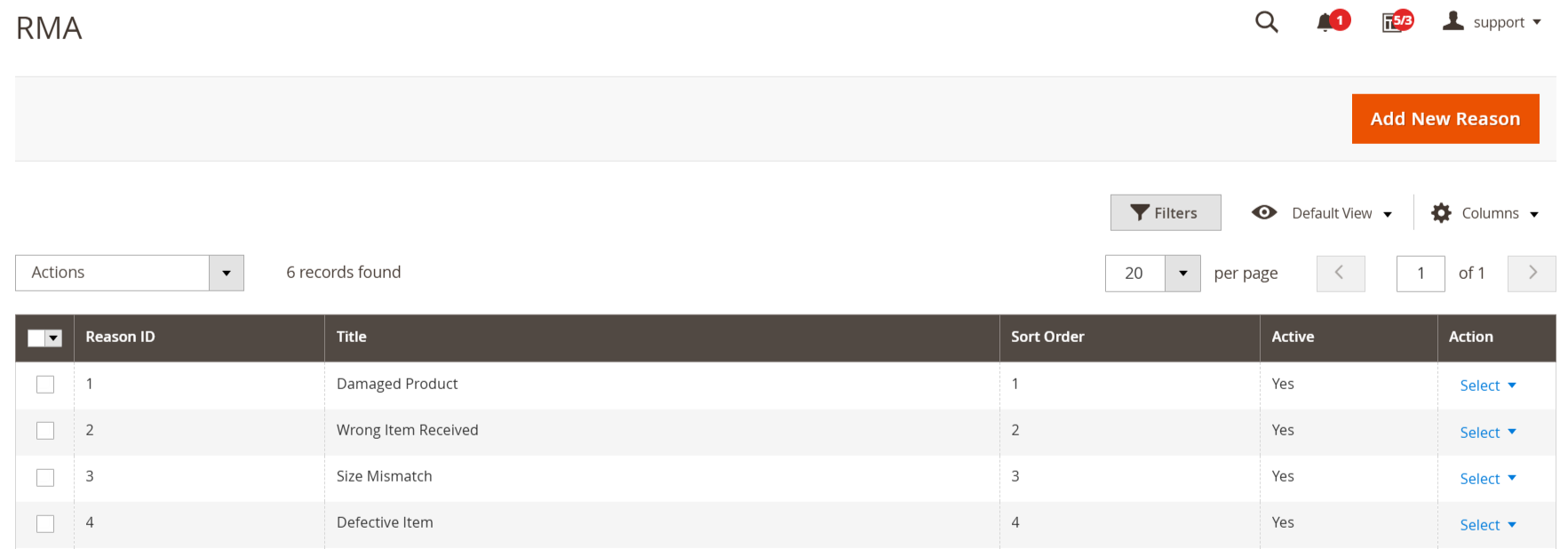
- Allow customers to select the most precise reason for their return request.
- Offer a predefined list of RMA reasons to streamline the return process.
- Enhance customer experience with clear and structured return options.
Manage Conditions
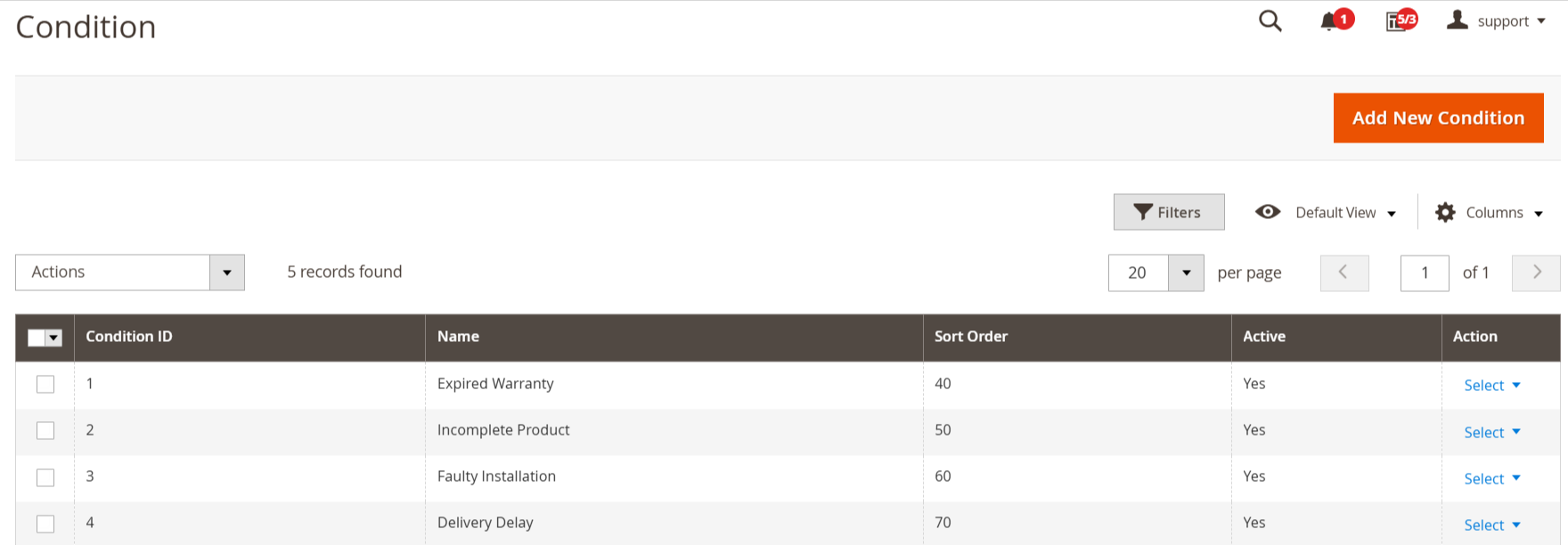
- Define custom conditions for returned products to categorize their state effectively.
- Gain valuable insights into product quality and customer satisfaction.
- Enhance the efficiency of your return workflow with structured condition management.
Manage Resolution
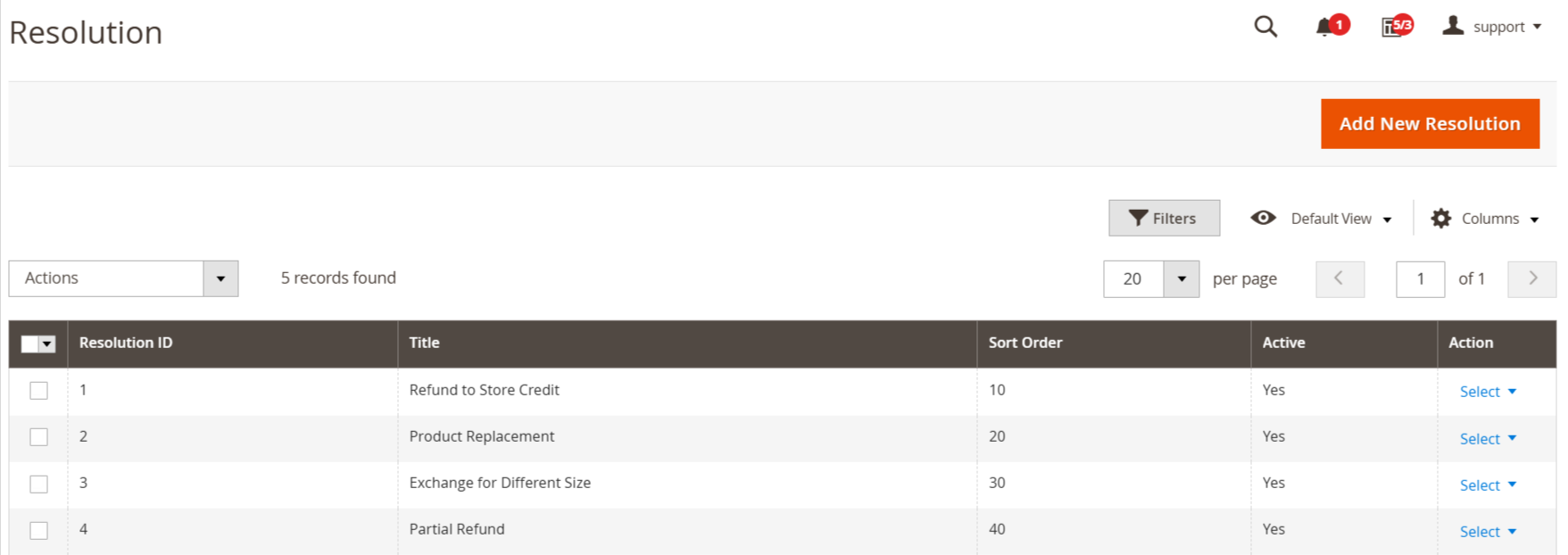
- Allow repair service as a resolution.
- Customize additional return resolutions based on your business needs.
- Improve customer satisfaction with enhanced RMA choices.
- Provide customers with flexible return options for a seamless post-sale experience.
Manage Custom Fields
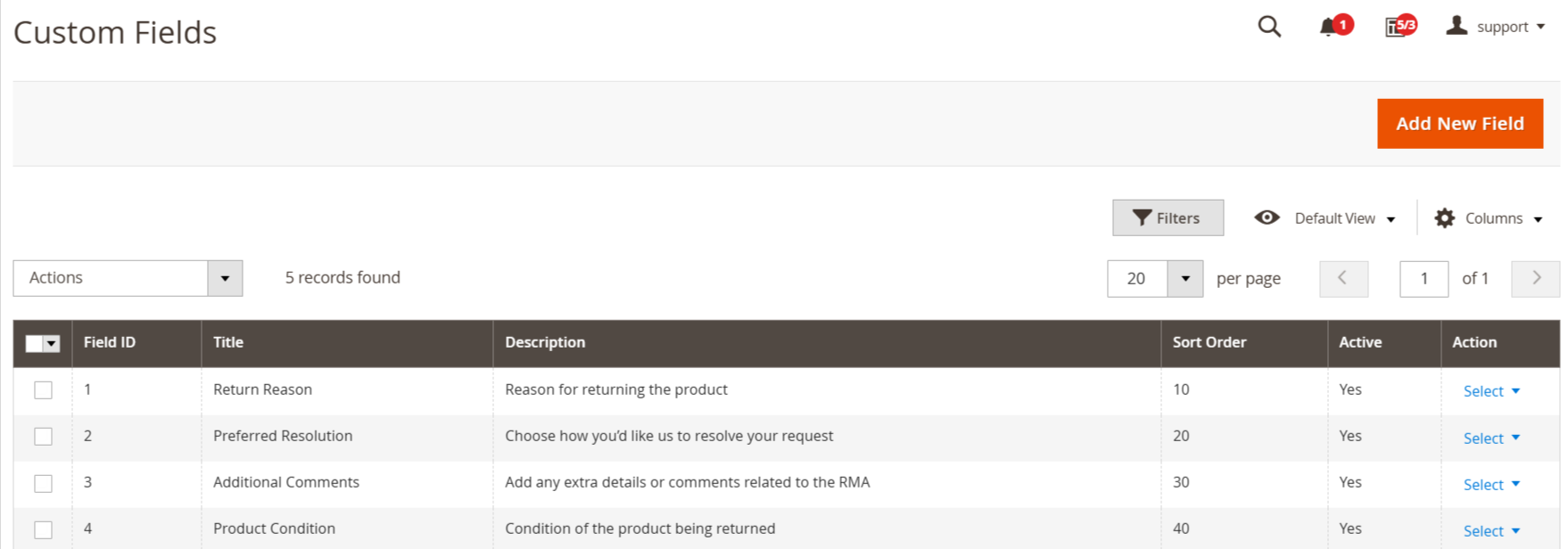
- Utilize custom fields to store extra details related to RMAs in the Magento 2 admin.
- Add custom fields to track shipping carriers, return tracking numbers, or other relevant data.
- Enhance RMA management by storing additional information specific to your business needs.
- Improve record-keeping and streamline return processing with customized RMA data fields.
Manage Quick Responses
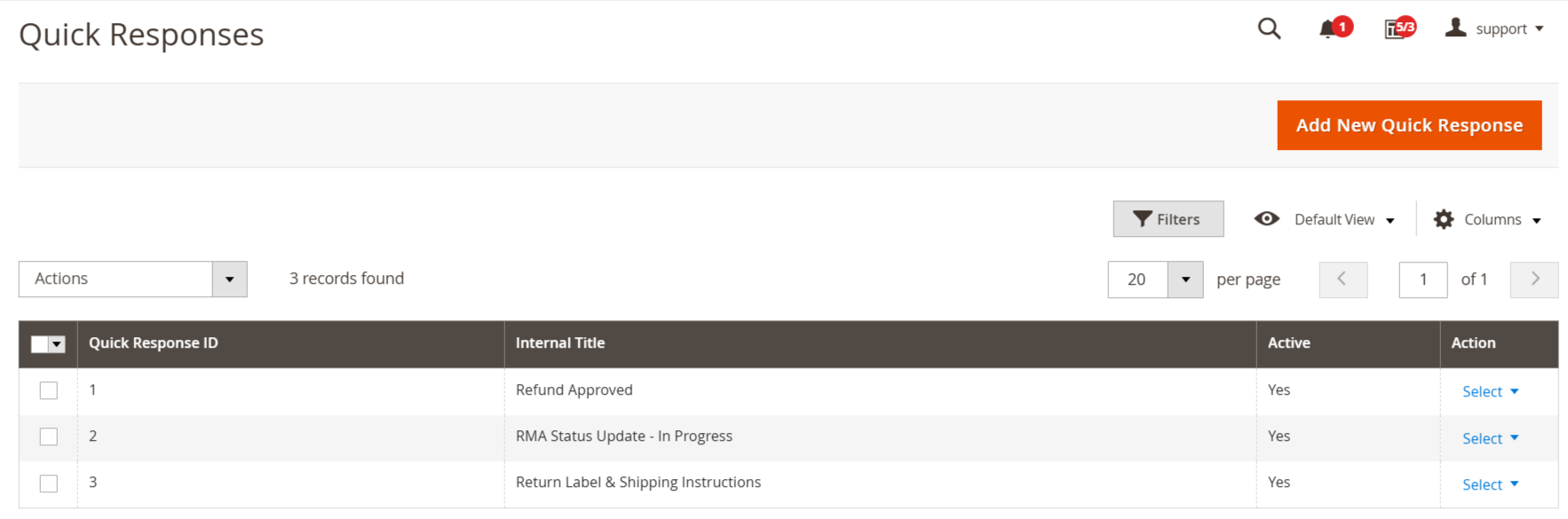
- Create and manage standard replies for common customer inquiries, such as return label links.
- Store admins can quickly choose predefined answers from a list, reducing response time.
- Save time and improve customer satisfaction with instant, consistent messaging.
- Ensure quick and accurate communication without typing the same responses repeatedly.
Mange Workflow Rules
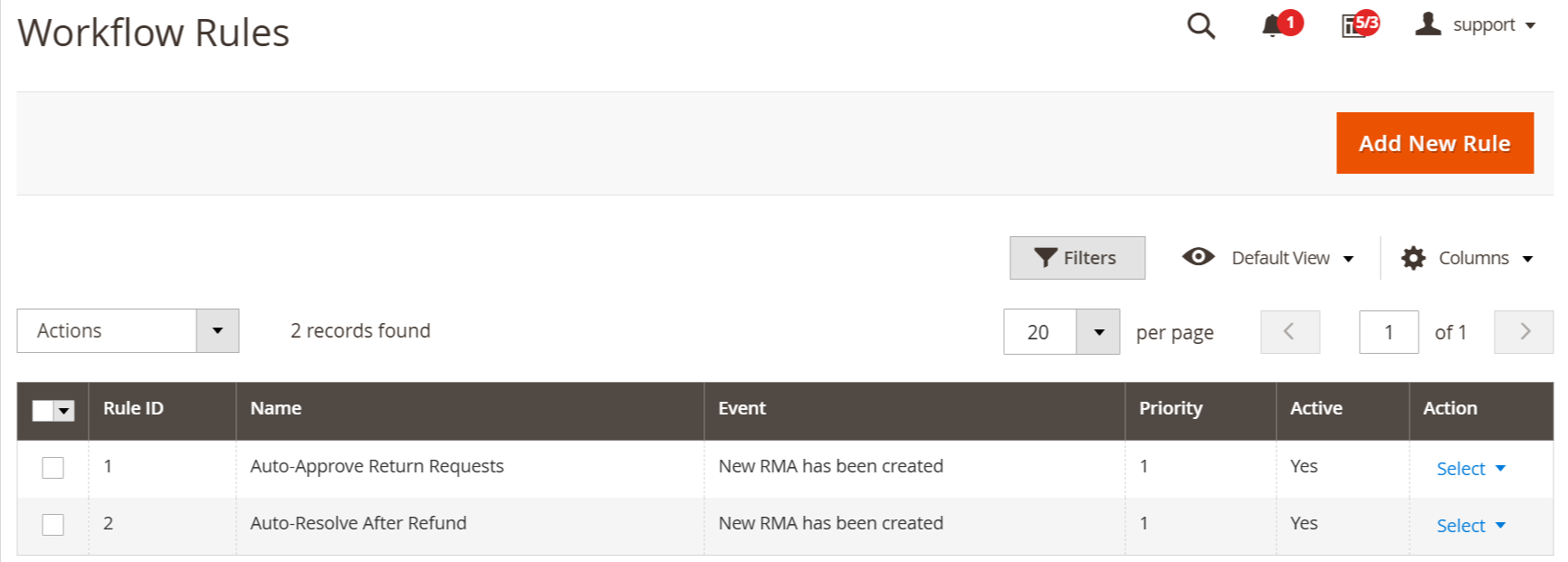
- Workflow Rules help automate repetitive tasks in RMA management.
- Streamline the return process by setting predefined rules based on specific events.
- Improve response time, ensuring a better customer experience.
Manage Return Addresses
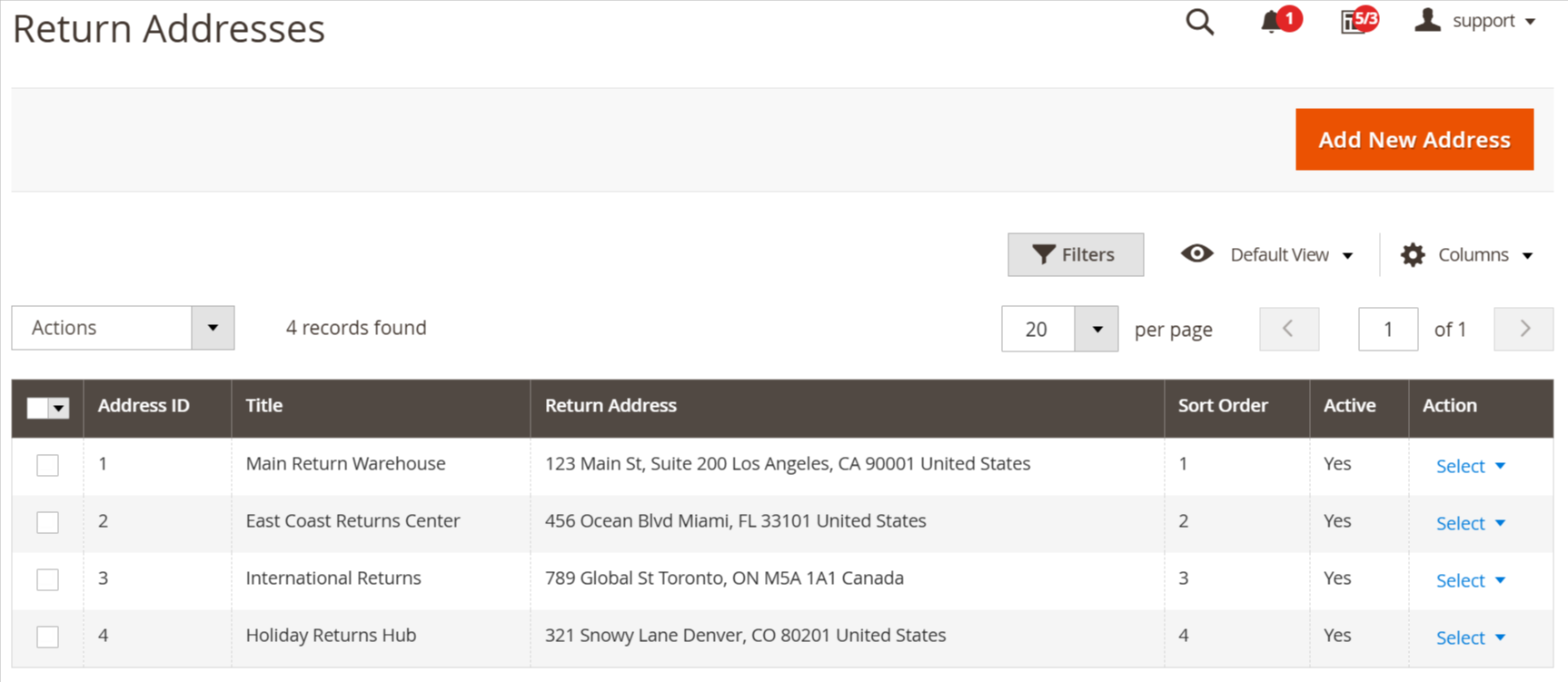
- Easily configure multiple return addresses for efficient returns management.
- Direct returned products to the most suitable location, such as a warehouse, department, or third-party provider.
- Enhance the RMA process by organizing returns based on location or product type.
- Improve operational efficiency and customer satisfaction with a structured return system.
FAQs
What is the RMA Extension in Magento 2?
What is the RMA Extension in Magento 2?
The RMA Extension allows customers to request product returns or exchanges, and helps store admins manage and track the return process efficiently.
Can guest users submit return requests?
Can guest users submit return requests?
Yes, most RMA extensions support guest returns using order ID and email for verification.
What actions can admins take on RMA requests?
What actions can admins take on RMA requests?
Admins can approve, reject, change status, add comments, or offer refunds, exchanges, or store credit.
Can customers track their RMA status?
Can customers track their RMA status?
Yes, customers can view the current status, messages, and history of each RMA from their account dashboard.
Is the RMA form customizable?
Is the RMA form customizable?
Yes, you can customize RMA fields such as return reason, resolution type, allowed items, and email notifications.
Customer Reviews
Changelog
2.2.0 – january 13, 2026
- Upgraded for compatibility with Magento 2.4.8-p3.
- Verified and compatible with PHP version 8.4.
2.1.1 – December 30, 2025
- Upgraded for compatibility with Magento 2.4.8-p3.
* Verified and compatible with PHP version 8.3.
2.1.0 - September 1, 2024
- Minor Bug Fixes
2.0.1 – June 27, 2025
- Fully compatible with Magento 2.4.8 -p1.
2.0.0 – July 11, 2024
- Fully compatible with Magento 2.4.X versions.
- Fix minor bugs.
1.0.8 – March 1, 2024
- Status grid in admin now includes tag display.
1.0.7 – May 9, 2023
- Fixed validation issue for required custom dropdown field has been resolved.
- Fixed customer name and email now correctly displayed on the RMA creation page.
1.0.6 – August 13, 2022
- Updated the Condition/Reason/Resolution Name column type to text to support longer entries.
- Added an exception handler for invalid guest RMA order inputs.
1.0.5 – January 9, 2022
- Resolved the error occurring in the Product Report section.
- Fixed the design issue of the Save button dropdown that appeared broken on click.
1.0.4 – April 15, 2021
- Resolved issue where order items were not automatically loaded when creating an RMA from an order, requiring the customer to reselect the order.
- Fixed missing customer postcode on the RMA print page.
- Corrected incorrect configuration field name.
1.0.3 – September 24, 2020
- Improved performance of the frontend RMA view page by optimizing the loading of attachments.
- Resolved issue where RMA failed to store the postcode in the database.
1.0.2 – June 11, 2019
- Resolved customer name search functionality in the RMA grid.
- Resolved quick response saving now works correctly per store view.
- Resolved custom field values now save properly per store view.
1.0.1 – September 10, 2018
- Resolved issue where custom status messages were sent to incorrect store view.
- Updated styling for product images on the RMA view page.
1.0.0 – March 7, 2018
- Initial launch.
We are committed to being open and transparent with our customers. When you purchase our module, you automatically receive one year of free support service and free updates.
Why is this important?
- Seamless Installation and Configuration: We understand that setting up a new module can take time to configure according to your specific needs. That's why we offer a full year of free support. Our experienced team is here to assist you with installation, configuration, and any questions you might have. We're eager to share our expertise to ensure you get the most out of your purchase.
- Stay Updated with Magento (Adobe Commerce) Releases: Magento releases new versions approximately every three months. These updates can sometimes introduce compatibility challenges. To keep your store running smoothly, we provide a year of free access to the latest versions of our modules, ensuring that you can upgrade Magento and our modules without encountering any obstacles.
- Subscription Included: Renewing your subscription ensures continued access to the latest updates and support from our team. This means you can be confident that any issues you encounter with the extension will be resolved quickly and efficiently. You can cancel your subscription at any time without any additional fees.
- Free Installation
- 30 Days Money Back
- 1 Year Of Free Support
- Open Source East To Customize
- Meets Magento Code Standards