

The Magento 2 Quick View Extension allows customers to instantly view product details in a pop-up window without leaving the current page, providing a seamless and efficient browsing experience that encourages faster decision-making and increases conversions.
Quick View Extension
- In Quick View pop-up add items such as Ajax Add to Cart.
- Display Quick View product details without loading the page.
- Customize Quick View button text and design.
- Add products easily to the Magento Quick View Popup Compare/Wish list.

Image Gallery
Highlighted Features
-
Quick Product Preview
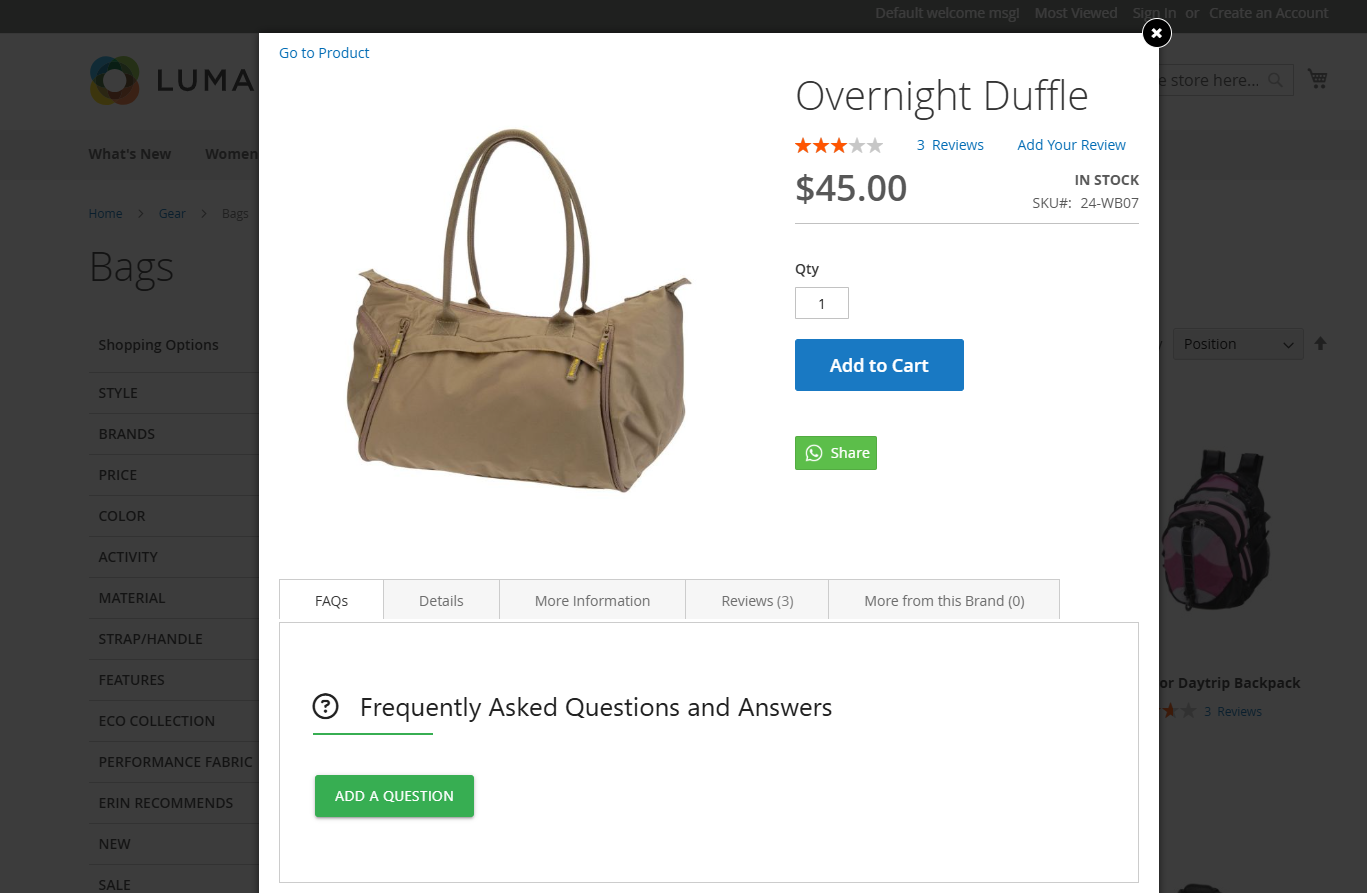
The Quick View Extension allows customers to view essential product details such as images, price, description, and options in a convenient pop-up window, enabling them to get a quick overview without navigating away from the current page.
-
Add to Cart from Quick View
Customers can directly add products to their shopping cart from the quick view pop-up, streamlining the purchase process by providing an "Add to Cart" button within the preview window.
-
Customizable Design and Layout
The extension offers the ability to customize the appearance and layout of the quick view pop-up, allowing it to seamlessly integrate with the store's existing theme and branding, enhancing the overall user experience.
-
Product Variations and Options
Customers can select and view various product options, such as size, color, and other attributes, directly within the quick view pop-up, providing a comprehensive overview of the available choices.
-
Integration with Other Extensions
The quick view feature can be integrated with other Magento 2 extensions, such as wishlist and product comparison tools, allowing customers to use these functionalities directly from the quick view pop-up.
-
Performance Optimization
The extension is optimized for fast loading times, utilizing efficient code and technologies to ensure that the quick view pop-up loads quickly and does not hinder the overall performance of the store.
Description
Display Quick View product details without loading the page
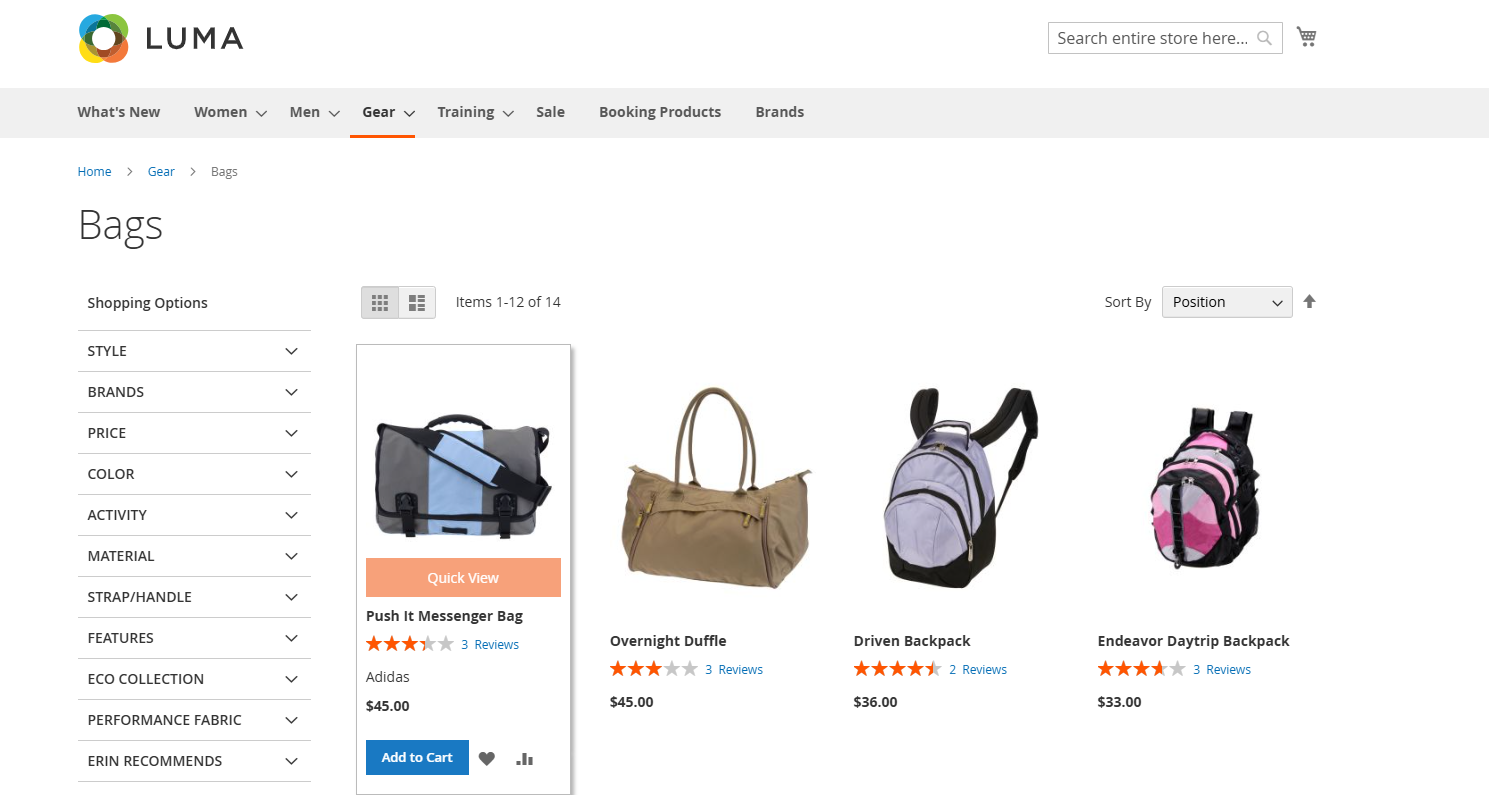
The Quick View Extension for Magento 2 lets customers preview products without leaving the page, enabling product comparisons, wish lists, and email sharing. It enhances user engagement, speeds up exploration, and improves the shopping experience with a mobile-friendly design, customization options, and seamless integration.
- Here Looking lots of Products and at which we are visualizing the button effect of Quick View that we added through store/configuration.
- Embeds a centrally positioned Quick View button within each product image thumbnail in category listings.
- Ensures uniform placement of the Quick View button for streamlined browsing and intuitive user experience.
- Facilitates easy access to product details without navigating away from the category page, enhancing user engagement and conversion rates.
Fill in the cart right from the pop-up "Quick view"
FAQs
Why are category URLs not updating after import in Magento 2?
Why are category URLs not updating after import in Magento 2?
If category URLs are not updating after importing, it could be due to URL rewrites being disabled or the CSV file missing the URL key field. Ensure that URL rewrites are enabled in your Magento configuration and that the CSV file includes the correct URL key values for the categories. Additionally, clear the Magento cache and reindex after importing to reflect the changes.
How do I fix JavaScript errors caused by the Quick View extension in Magento 2?
How do I fix JavaScript errors caused by the Quick View extension in Magento 2?
JavaScript errors in the Quick View extension can be caused by conflicts with other JavaScript libraries, outdated scripts, or improper initialization. Use the browser console to identify the error message. Ensure all required scripts are loaded and there are no conflicts between jQuery or other JavaScript files. You may need to defer or reorder script loading in requirejs-config.js or layout.xml.
Why is the Magento 2 Quick View extension not working after installation?
Why is the Magento 2 Quick View extension not working after installation?
If the Quick View extension is not working after installation, ensure that it is properly enabled from the admin panel. Check if you have flushed the cache and recompiled your Magento installation. Also, ensure that the extension is compatible with your Magento version and that there are no conflicts with other installed modules or custom themes.
How can I fix slow loading times for the Quick View popup in Magento 2?
How can I fix slow loading times for the Quick View popup in Magento 2?
Slow loading times for the Quick View popup can be due to large image files, slow server response, or unoptimized JavaScript and CSS. To fix this, optimize your product images, enable full-page caching, and ensure that JavaScript and CSS files are minified and merged. You can also look into lazy loading techniques for faster popup display.
Can I disable the Quick View button for certain products or categories in Magento 2?
Can I disable the Quick View button for certain products or categories in Magento 2?
Yes, you can disable the Quick View button for specific products or categories by modifying the product list template or using custom logic in the layout XML. You can also use category or product attributes to conditionally display the Quick View button based on certain criteria like product type or category ID.
Ask a question
Customer Reviews
Ratings
5
Enhances user shopping experience
Review by
RaviPatel
Customers can compare products and review details faster, leading to better engagement.
Ratings
5
Improves product browsing efficiency
Review by
KenjiMorita
Allows customers to view product details in a popup without leaving the category page, reducing navigation steps.
Ratings
5
Smooth and responsive interface
Review by
ElenaVargas
The quick view modal loads quickly and presents product information in a clean and structured layout.
Ratings
5
Reliable and stable
Review by
GraceHarrington
We have been using this extension for months with no issues.
Ratings
5
Helpful product summary
Review by
ConnorLangston
Customers can see important info like price, SKU, and stock in the quick view popup.
Ratings
5
Keeps customers browsing
Review by
HannahWinchester
The quick view feature encourages more browsing because customers don’t lose their place.
Ratings
5
Perfect for large catalogs
Review by
NoahLangston
When there are many products on the catalog page, this feature helps users explore without navigating back and forth.
Ratings
5
Excellent add‑to‑cart from popup
Review by
EmilyWhitfield
Adding products to the cart directly from quick view works flawlessly.
Ratings
5
Very intuitive UI
Review by
OliviaCarson
The quick view popup looks great and displays product information clearly without lag.
Ratings
5
Very helpful for product browsing
Review by
HenryPrescott
Customers can see product reviews, price, and add to cart without extra clicks.
Ratings
5
Highly recommended extension
Review by
TrevorLangdon
If you want to simplify product browsing and improve conversions, this module is very helpful.
Ratings
5
Improves shopping experience
Review by
LiamPrescott
Customers love being able to check details without navigating away from the product list.
Ratings
5
Smooth installation
Review by
DylanFairfax
Installation was easy and the module worked immediately after setup.
Ratings
5
Great for faster browsing
Review by
DanielWhitmore
This quick view extension makes browsing much faster. Customers can view product details without leaving the category page which improves engagement.
Ratings
5
Enhances Customer Shopping
Review by
Noah T.
Love this extension! The quick view feature makes browsing and purchasing products so much easier for my customers.
Ratings
5
Excellent performance
Review by
SophiaLangford
The quick view loads fast and doesn’t slow down the category pages.
Ratings
5
Improved Shopping Experience
Review by
Ava F.
QuickView is a fantastic tool that allows customers to view product details without leaving the page. It has really improved my store’s conversion rates.
Ratings
5
Increases add‑to‑cart conversions
Review by
AmeliaFairfax
Many customers add items to the cart directly from the quick view popup which boosts sales.
Ratings
5
Easy to configure
Review by
EthanMontgomery
Setup was straightforward and we had the popup working in minutes.
Ratings
5
Perfect for category pages
Review by
NatalieHarrington
It works especially well on category listing pages with many products.
Ratings
5
Helps customers choose faster
Review by
LilyPennington
Buyers can quickly evaluate product information and decide without loading new pages.
Ratings
5
Perfect for UX optimization
Review by
CalebWhitaker
Improving browsing speed has noticeably increased customer engagement.
Ratings
5
Useful for enhancing UX
Review by
MarcusLangdon
Quick access to product details improves how customers interact with the catalog.
Ratings
5
Very flexible popup
Review by
SamuelLangley
We can configure which product details appear in the quick view which is very helpful.
Ratings
5
Clean and responsive design
Review by
IsabellaWhitmore
The popup looks great on both desktop and mobile devices.
Ratings
5
Good support from developers
Review by
PaigeThornton
Support helped us configure advanced settings quickly.
Ratings
5
Excellent Magento integration
Review by
AbigailMontrose
The extension integrates smoothly with Magento and respects all product settings.
Ratings
5
Improves category navigation
Review by
JackBradford
Users don’t have to wait for page loads which speeds up browsing.
Ratings
5
Good compatibility with themes
Review by
MasonRedford
It worked perfectly with our custom theme without any styling issues.
Ratings
5
Great mobile experience
Review by
VictoriaThornton
The quick view popup works very well on mobile screens and encourages mobile shoppers.
Ratings
5
Very customizable
Review by
TylerMontague
We adjusted the popup layout and included our brand style easily.
Ratings
5
Works well on desktop
Review by
ChloeRedmond
The quick view looks clean and intuitive on desktop screens.
Ratings
5
Very practical extension
Review by
ZoeCarrington
This is one of those small features that has a big impact on the shopping experience.
Ratings
5
Great for product comparisons
Review by
BrookeFairfax
Shoppers can quickly compare products without loading new pages.
Ratings
5
Lightweight and efficient
Review by
NathanPrescott
The module does not make pages heavier even with many products listing.
Ratings
5
User-Friendly and Efficient
Review by
Jason Lee
This extension is easy to use and enhances the shopping experience. Love it!
Ratings
5
Great for Quick Browsing
Review by
Anna Kelly
Customers can view products without leaving the page. This has increased our conversions!
Ratings
5
Enhances Customer Experience
Review by
Michael Perez
The quick view feature is a fantastic addition! Customers can easily check product details.
Changelog
1.1.1 – December 30, 2025
- Upgraded for compatibility with Magento 2.4.8-p3.
- Compatible with PHP version 8.4.
1.1.0 - September 1, 2024
- Minor Bug Fixes
1.0.6 – June 20, 2024
- Supports Magento version 2.4.7-p3.
1.0.5 – May 29, 2023
- Supports Magento version 2.4.6
- Enhanced user interface design.
1.0.4 – October 20, 2021
- Resolved minor bugs.
1.0.3 – April 1, 2021
- Implemented a custom design for the Quick View popup.
- Integrated related products, cross-sell products, and a CMS block within the Quick View popup.
- Resolved minor bugs and improved overall stability.
1.0.2 – April 1, 2021
- Compatible with Magento 2.4.2
- Resolved minor bugs.
1.0.1 – October 15, 2020
- Compatible with Magento version 2.4.0
1.0.0 – February 25, 2018
- Release Initial Version.
$49
No surprise fees
We are committed to being open and transparent with our customers. When you purchase our module, you automatically receive one year of free support service and free updates.
Why is this important?
- Seamless Installation and Configuration: We understand that setting up a new module can take time to configure according to your specific needs. That's why we offer a full year of free support. Our experienced team is here to assist you with installation, configuration, and any questions you might have. We're eager to share our expertise to ensure you get the most out of your purchase.
- Stay Updated with Magento (Adobe Commerce) Releases: Magento releases new versions approximately every three months. These updates can sometimes introduce compatibility challenges. To keep your store running smoothly, we provide a year of free access to the latest versions of our modules, ensuring that you can upgrade Magento and our modules without encountering any obstacles.
- Subscription Included: Renewing your subscription ensures continued access to the latest updates and support from our team. This means you can be confident that any issues you encounter with the extension will be resolved quickly and efficiently. You can cancel your subscription at any time without any additional fees.
- Free Installation
- 30 Days Money Back
- 1 Year Of Free Support
- Open Source East To Customize
- Meets Magento Code Standards