Admin Actions Log Extension
Magento 2 Admin Actions Log Extension equips your Magento 2 (Adobe Commerce/Adobe Commerce Cloud) store with comprehensive admin activity tracking, enabling you to monitor all backend actions in real time—just like a black box recorder for your eCommerce operations.
- Tracking all logged actions automatically.
- Manage log details for certain time period.
- Recent changes of items can restore.
- Notify every time when login.
- All activity of sessions can be manage smoothly.
- History of admin can be monitored.

Highlighted Features
-
Detailed Logging of Admin Actions
Tracks all actions performed by admin users such as product edits, order updates, and configuration changes. Logs specific details like the date, time, and IP address of the action.
-
User-Specific Activity Tracking
Monitors the actions of each admin user individually, helping track the performance and identify errors. Allows filtering logs by admin user to see their specific actions.
-
Real-Time Monitoring
Admin actions can be tracked and monitored in real-time, meaning you can instantly see changes as they happen. Real-time logs enable immediate action if suspicious activity is detected, improving store security. Administrators can access a live feed of actions directly from the backend, allowing for instant visibility into ongoing tasks and modifications.
-
View and Export Logs
The extension provides a comprehensive log viewer within the Magento admin interface, where all logged actions can be viewed and filtered based on criteria like date, user, and action type. Administrators can export logs into formats like CSV or XML, allowing them to generate reports or analyze data outside Magento. Exporting logs is useful for maintaining records of activity, sharing with external teams, or auditing purposes.
-
Log Retention and Cleanup
Alternatively, admins can manually delete logs when necessary or keep certain logs indefinitely if required for long-term audits or legal compliance.
-
Action Type Filtering
Admins can easily filter logs based on different types of actions. For example, you can choose to view only logs related to product edits, customer management, or order updates. This filtering capability simplifies the process of finding relevant information, especially in a busy store with many admins.
-
Login and Logout Tracking
The extension logs all admin login and logout activities, including successful and failed login attempts. Failed login attempts are particularly important to track as they may indicate potential security threats such as brute-force attacks. This feature helps ensure that only authorized personnel can access the Magento backend and enables the identification of any suspicious login activity.
-
Admin Notifications
The extension can be configured to send automated notifications to administrators when critical actions are performed, such as changes to store settings, payment methods, or shipping options. Notifications can be sent via email, providing real-time alerts to store owners or security teams to ensure that they are aware of significant changes.
-
Error and Exception Logging
In addition to tracking standard actions, the extension logs any errors or exceptions that occur during admin activities. This can include issues like failed product updates, system configuration errors, or database query failures.
Description
Actions Logs
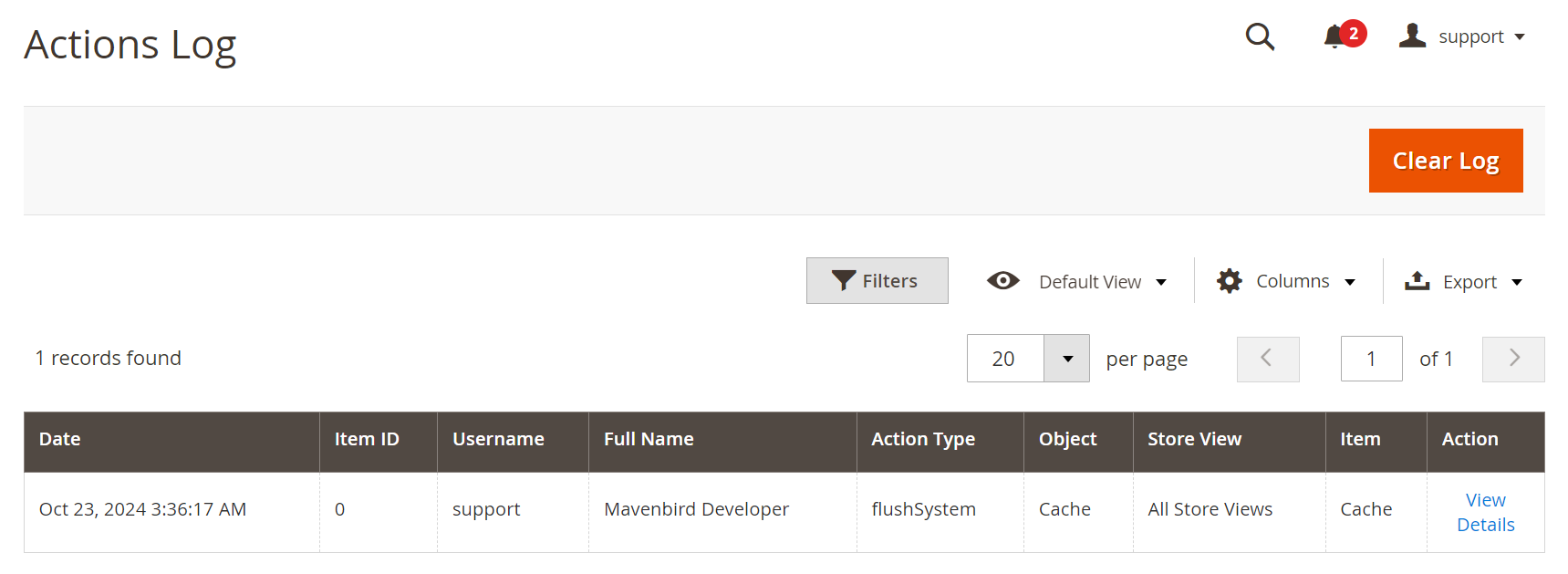
The Admin Actions Log Extension for Magento 2 tracks all admin activities in real time, offering detailed logs, customizable retention, filters, email alerts, and enhanced security for better management and audit compliance.
- Go to System > Admin Actions Log > Actions Log to see the Action Log of all administrators.
- Clear Log button allows administrators to remove log entries.
- The actions log shows a record of admin activities, including the date, item ID, username, full name, action type, object affected, store view, and specific item.
Active Sessions
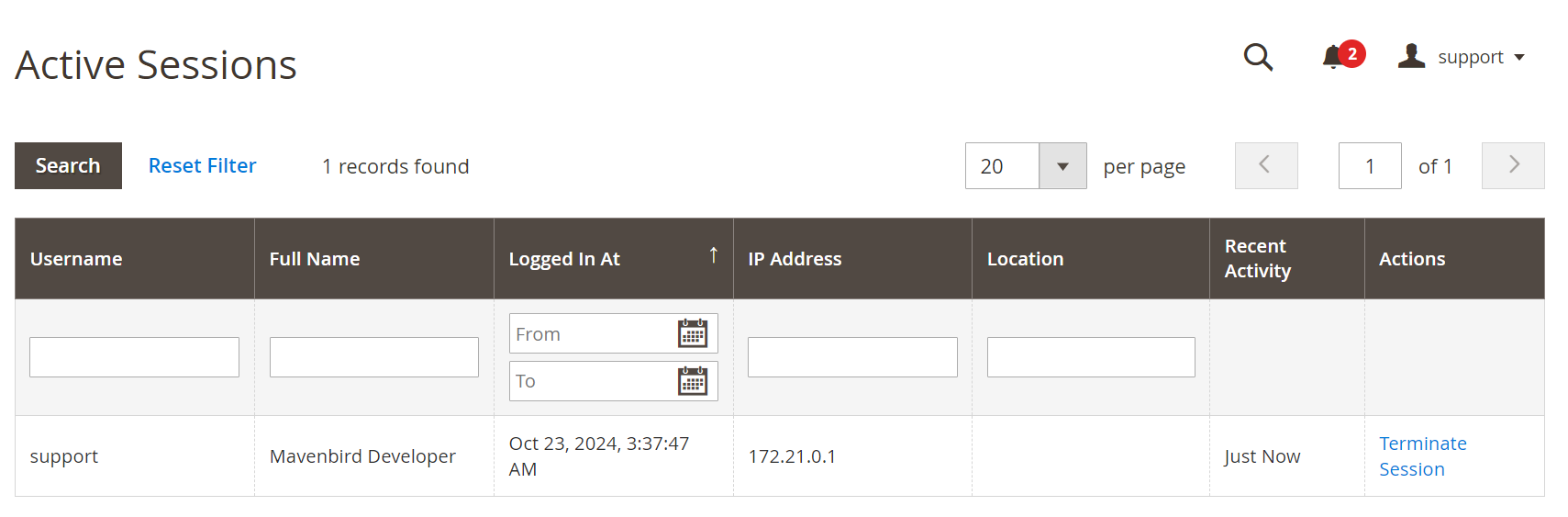
- Go to System > Admin Actions Log > Active Sessions interface for an administrator.
- The Active Sessions section lists the current active session for the user "support," showing the login time, IP address, and recent activity, along with an option to terminate the session if necessary.
Login Attempts
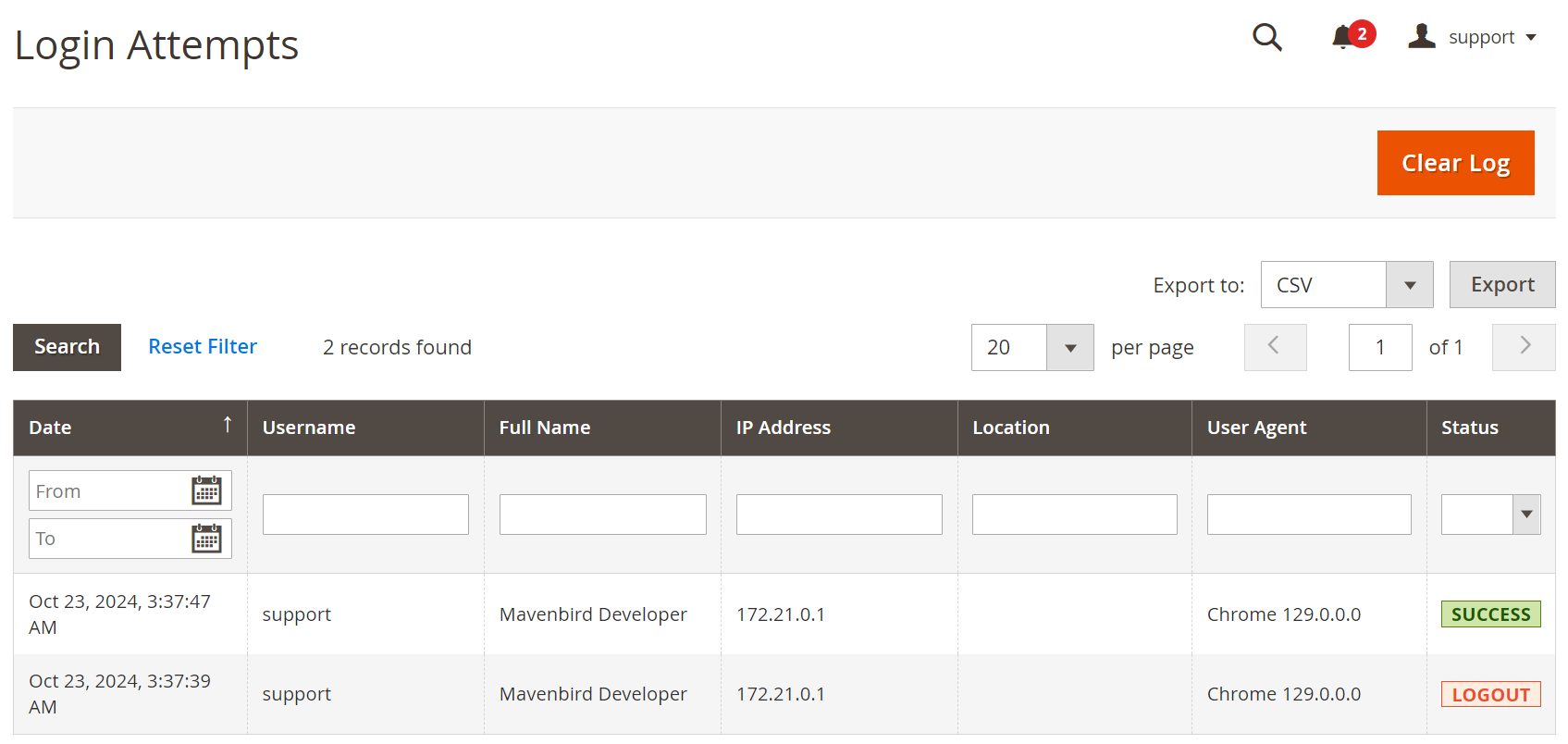
- Go to System > Admin Actions Log > Login Attempts to see the Login Attempts for an administrator.
- Clear Log button allows administrators to remove log entries.
- The Login Attempts section records two login attempts by the user "support," detailing the timestamps, IP address, user agent, and status of each attempt, indicating one successful login and one logout.
Visit History
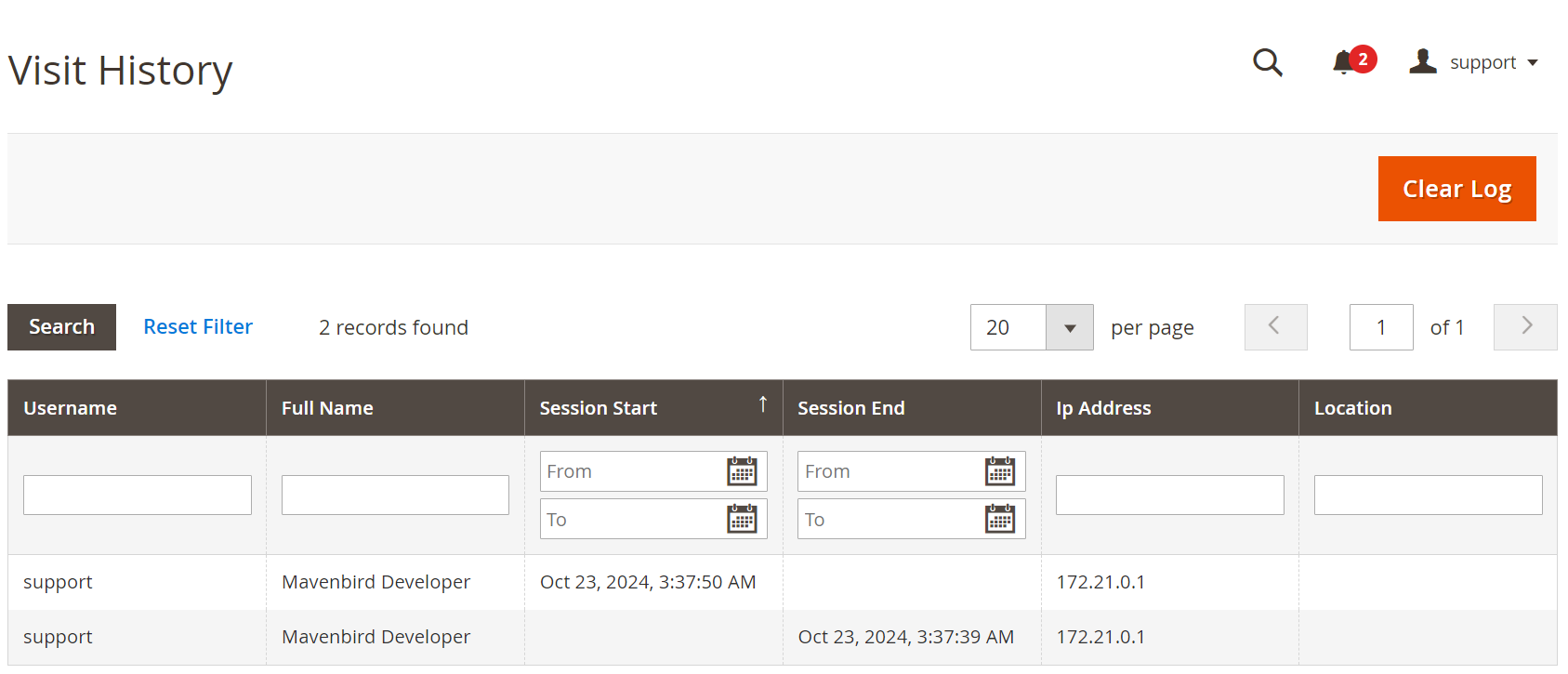
- Go to System > Admin Actions Log > Visit History to see the Login Attempts for an administrator.
- Clear Log button allows administrators to remove log entries.
- The Visit History section provides a log of user sessions, showing two records for the user "support," including session start and end times, IP address, and location, allowing administrators to track user activity effectively.
FAQs
What is the "Admin Actions Log" module?
What is the "Admin Actions Log" module?
The "Admin Actions Log" module records all actions performed by admin users, providing a clear audit trail for security and accountability.
Why should I use the "Admin Actions Log" module?
Why should I use the "Admin Actions Log" module?
It helps store owners monitor admin activities, ensuring transparency, security, and enabling audits when necessary.
What types of admin actions are logged?
What types of admin actions are logged?
The module logs all types of admin activities such as user login, order management, product updates, and changes in configuration.
Can I filter and search logged actions?
Can I filter and search logged actions?
Yes, the module allows you to filter logs by admin user, date, action type, and more, making it easier to find specific activities.
How do I view the logs in Magento?
How do I view the logs in Magento?
Admin actions can be viewed in a dedicated log section in the backend, offering easy access and readability for all logged events.
Can I delete or clear the action logs?
Can I delete or clear the action logs?
Yes, the module allows store admins to delete or clear logs as needed, but it’s advised to keep logs for security and auditing purposes.
How does the module improve store security?
How does the module improve store security?
By keeping a record of every admin action, the module ensures that unauthorized activities can be identified, which helps prevent security breaches.
Is the "Admin Actions Log" module customizable?
Is the "Admin Actions Log" module customizable?
Yes, the module can be customized to log specific actions or exclude certain events according to your needs.
Customer Reviews
Changelog
1.2.0 – january 15, 2026
- Upgraded for compatibility with Magento 2.4.8-p3.
- Compatible with PHP version 8.4.
1.1.1 – December 30, 2025
- Upgraded for compatibility with Magento 2.4.8-p3.
- Verified and compatible with PHP version 8.3.
1.1.0 – September 1, 2024
- Minor Bug Fixes
1.0.0 – February 19, 2018
- Release Initial Version.
We are committed to being open and transparent with our customers. When you purchase our module, you automatically receive one year of free support service and free updates.
Why is this important?
- Seamless Installation and Configuration: We understand that setting up a new module can take time to configure according to your specific needs. That's why we offer a full year of free support. Our experienced team is here to assist you with installation, configuration, and any questions you might have. We're eager to share our expertise to ensure you get the most out of your purchase.
- Stay Updated with Magento (Adobe Commerce) Releases: Magento releases new versions approximately every three months. These updates can sometimes introduce compatibility challenges. To keep your store running smoothly, we provide a year of free access to the latest versions of our modules, ensuring that you can upgrade Magento and our modules without encountering any obstacles.
- Subscription Included: Renewing your subscription ensures continued access to the latest updates and support from our team. This means you can be confident that any issues you encounter with the extension will be resolved quickly and efficiently. You can cancel your subscription at any time without any additional fees.
- Free Installation
- 30 Days Money Back
- 1 Year Of Free Support
- Open Source East To Customize
- Meets Magento Code Standards